
Many organizations still generate quotes and contracts manually outside Dynamics 365 Sales. Acadia’s Dynamic Template Engine solves the challenges of generating customized quotes and contracts in Dynamics 365 Sales. It introduces CPQ automation, dynamic templates, seamless document generation, and efficient contract lifecycle management. Key features include Customizable Templates, configurable document sections, Dataverse integration, Template Field Mappings, and Power Automate workflows for Document Generation. This guide explains the architecture, setup, field mapping process, and real examples of how Acadia transforms quoting and contract generation within the Dynamics 365 ecosystem.
Context and Problem Statement: Overcoming the Challenges in Quote and Proposal Generation for Dynamics 365 Sales
The Problem with Traditional Quoting in D365 Distribution
For many organizations using Dynamics 365 Sales, generating polished, client-ready quotes and proposals remains a significant challenge. While Dynamics 365 Distribution provides out-of-the-box (OOB) Word templates for generating quotes and proposals, these templates have significant limitations. They are fixed in format and support only static field mappings, offering minimal flexibility for dynamic data or conditional sections. As a result, organizations often struggle to adapt these templates to complex quoting needs without manual intervention or custom development. Distribution teams typically end up exporting data into Word or PDF templates, manually copying details from multiple entities (like Quotes, Orders, and Line Items), and reformatting the documents before sending them to clients, or managing the quoting process outside of Dynamics 365.
This approach not only delays turnaround time but also introduces errors and inconsistencies, especially for organizations and industries that require highly variable and customized documentation. For instance, manufacturing, construction, and fire and security sectors often deal with varying quote structures, technical specifications, service packages, or compliance clauses that demand different quote templates or formats based on the deal type, or even custom formats for each client. The static nature of the out-of-box templates makes it difficult to accommodate such variations efficiently and without creating additional silos in the distribution process.
For distribution and legal teams in such industries where every deal requires customized technical and financial documentation, this becomes a major bottleneck. Admins and solution architects also face challenges maintaining separate templates and ensuring data mapping consistency across entities, while even minor changes in document templates such as adding a new field, updating section logic, or modifying mapped data typically require code-level changes in the underlying system or updates to Power Automate flows. Each update must be developed, tested, and redeployed by technical teams, consuming valuable time and increasing dependency on developers for tasks that should ideally be handled by business users, ultimately reducing agility and making it difficult to keep templates aligned with evolving business requirements.
Solution: Acadia Dynamic Template Engine
Acadia’s Dynamic Template Engine eliminates these constraints by enabling the creation of flexible, data-driven documents that adapt to each quote or deal scenario. It automates document generation directly from Dynamics 365 Sales entities such as Quote, Line Items and their related tables, allowing users to seamlessly produce branded, data-driven proposals and contracts without leaving the Dynamics workspace.
What This Guide Covers
- Dynamic Templates and User Templates
- Dataverse field mapping
- Document generation from Quote records
- Real client example from the fire and security industry
Architecture of Acadia Contract Automation for Dynamics 365 Distribution (Dataverse, Power Automate, SharePoint)
Acadia leverages the Power Platform ecosystem, natively connected with Dynamics 365 Sales and Microsoft Dataverse, to enable configurable, intelligent document generation. It functions as a standalone AI-first Contract Lifecycle Management platform, as well as an add-on for D365 Distribution.
At its core, the solution combines:
- Dynamics 365 Sales as the source of truth for client, quote, and product data.
- Acadia’s Dynamic Templates for mapping fields and sections dynamically into Word templates.
- Dataverse and SharePoint integration for storing and managing generated files.
- Power Automate flows for triggering document generation.
High-Level Flow:
- User initiates contract or quote creation from a Dynamics 365 record
-
The system prompts the user to select a
Document Template, allowing document
customization on the
User Template created earlier in
Acadia.
- This template defines which sections, tables, and content blocks to include in the document.
- Users can choose specific sections (e.g., pricing summary, terms & conditions, technical scope) through checkboxes before generation.
- Each selected Document Template is linked to a Dynamic Template, which holds all field mappings and data relationships to pull live data from Dynamics 365 standard or custom entities (Quote (msdyn_quote), Line Items (quotedetail), Account (account), Contact (contact), etc.).
- Mappings dynamically pull data from related entities; including Quote (msdyn_quote), Line Items (quotedetail), Account (account), Contact (contact), etc.
- The system generates the document in Word online and stores it in SharePoint, embedded in the model-driven app.
- The generated document can then move through review, redlining, and signing workflows.
Prerequisites:
- Dynamics 365 Sales
- Power Apps premium environment
- Acadia installed in the client tenant
- Word Online enabled
Who This Is For
- Dynamics 365 administrators
- Solution architects
- Distribution operations leads
- CPQ managers
- Legal and contract teams
How to Configure Dynamic Templates in Acadia for Dynamics 365 Sales: Step-by-Step
Below are the key steps to configure and use Acadia Dynamic Templates for contract automation in Dynamics 365 Sales:
Step 1: Create a Dynamic Template in Acadia
- Navigate to the Dynamic Templates area in Acadia and click + New to create a new template.
- Upload the base Word document that will serve as the foundation for the contract or quote.
-
The uploaded document is displayed in an
embedded Word Online iFrame under the
Document tab, allowing users to:
- Edit the content directly within Acadia.
- Add placeholders for dynamic field mappings.
-
Under the General tab:
- Enter the Template Name, Description, Template Type, and Document Type (lookup).
- Use the Template Mappings subgrid to view existing mappings or create new ones via + New Template Field Mapping.
- Save the configuration once setup is complete.
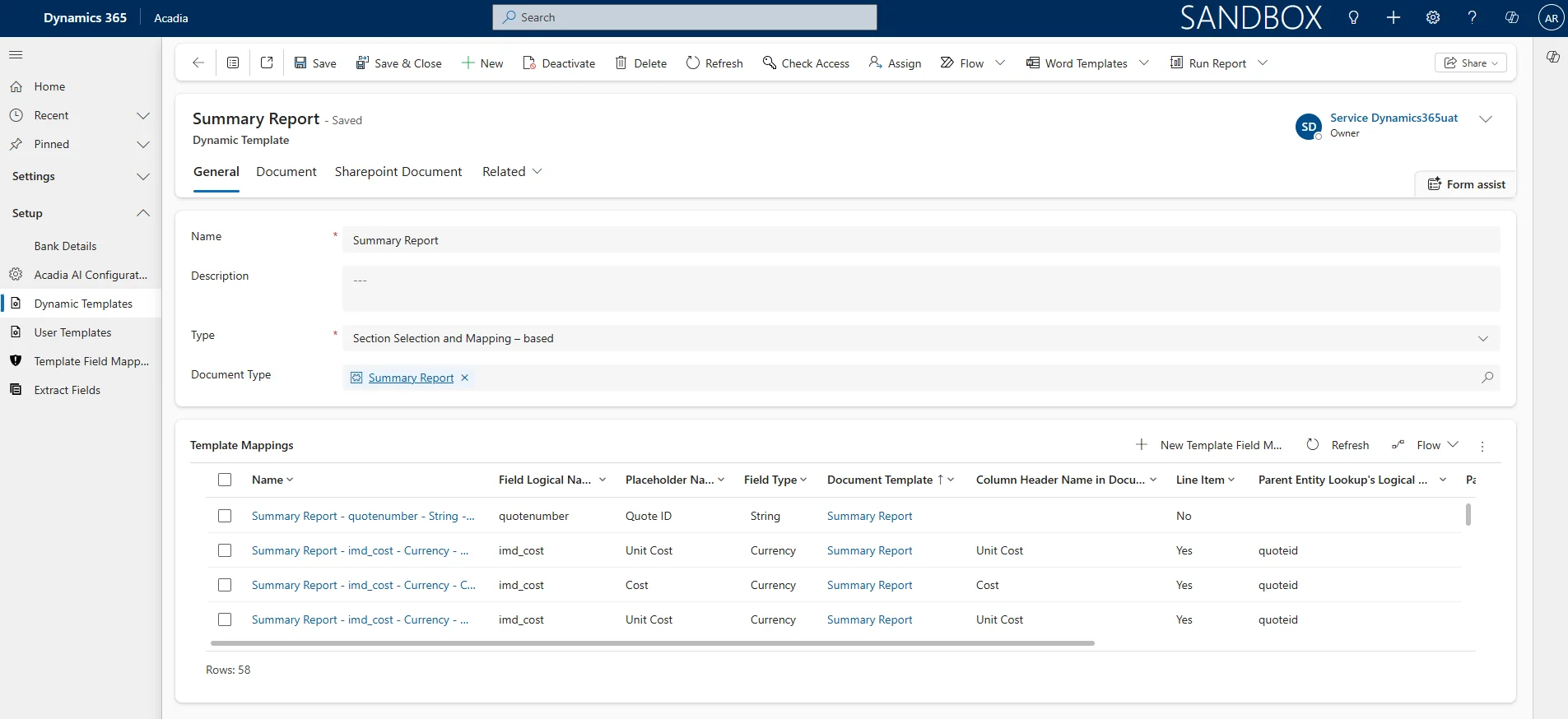
Figure 1. Dynamic Field Mapping
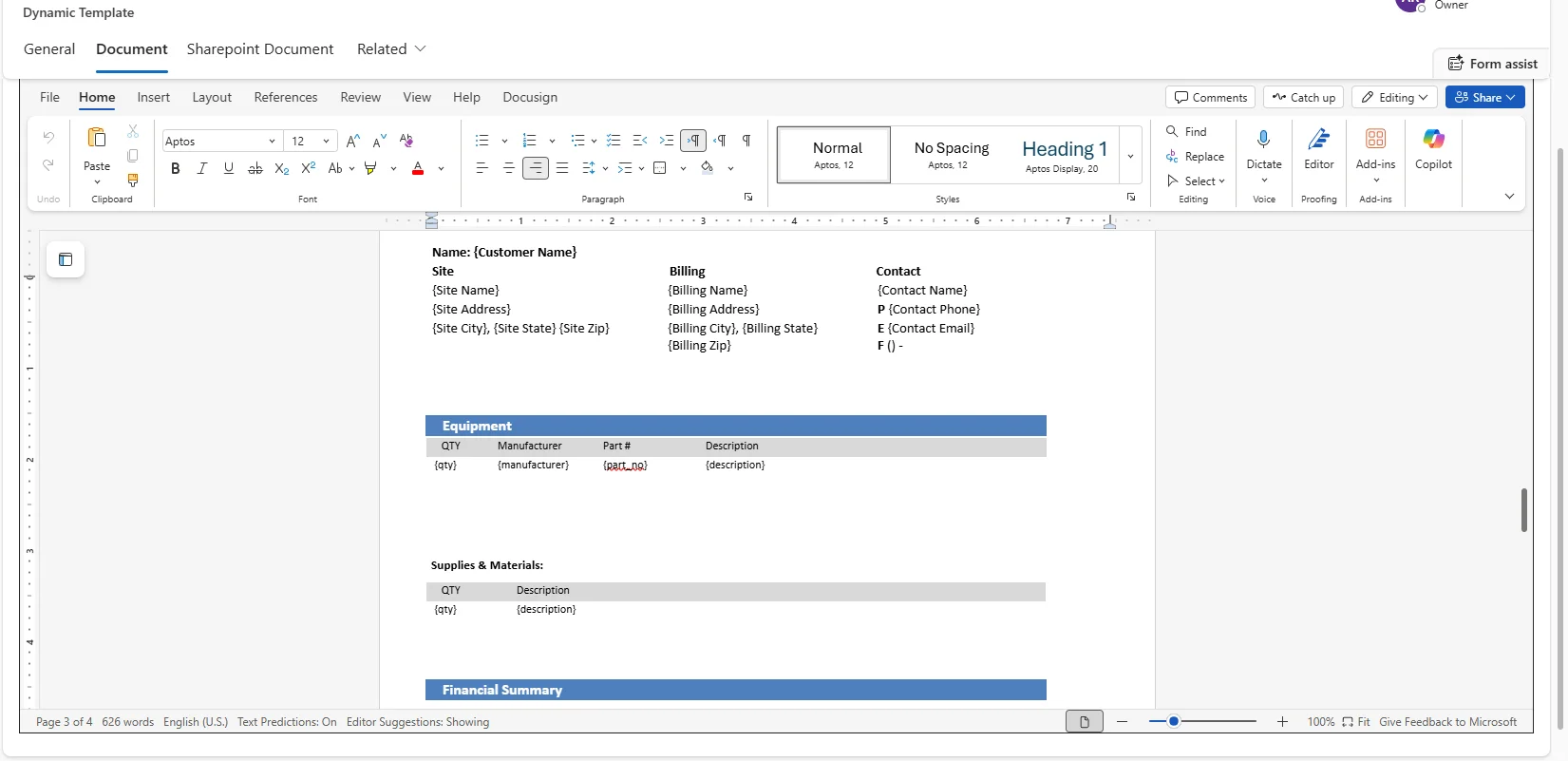
Figure 2. Adding Placeholders through Word iFrame in Acadia
Step 2: Map Dynamics 365 Data Fields
- Open the Template Mappings subgrid to define how data from Dynamics 365 / Dataverse populates the document.
- For each placeholder in the Word document, map it to the corresponding field.
- Save the mapping configuration to ensure accurate data population during document generation.
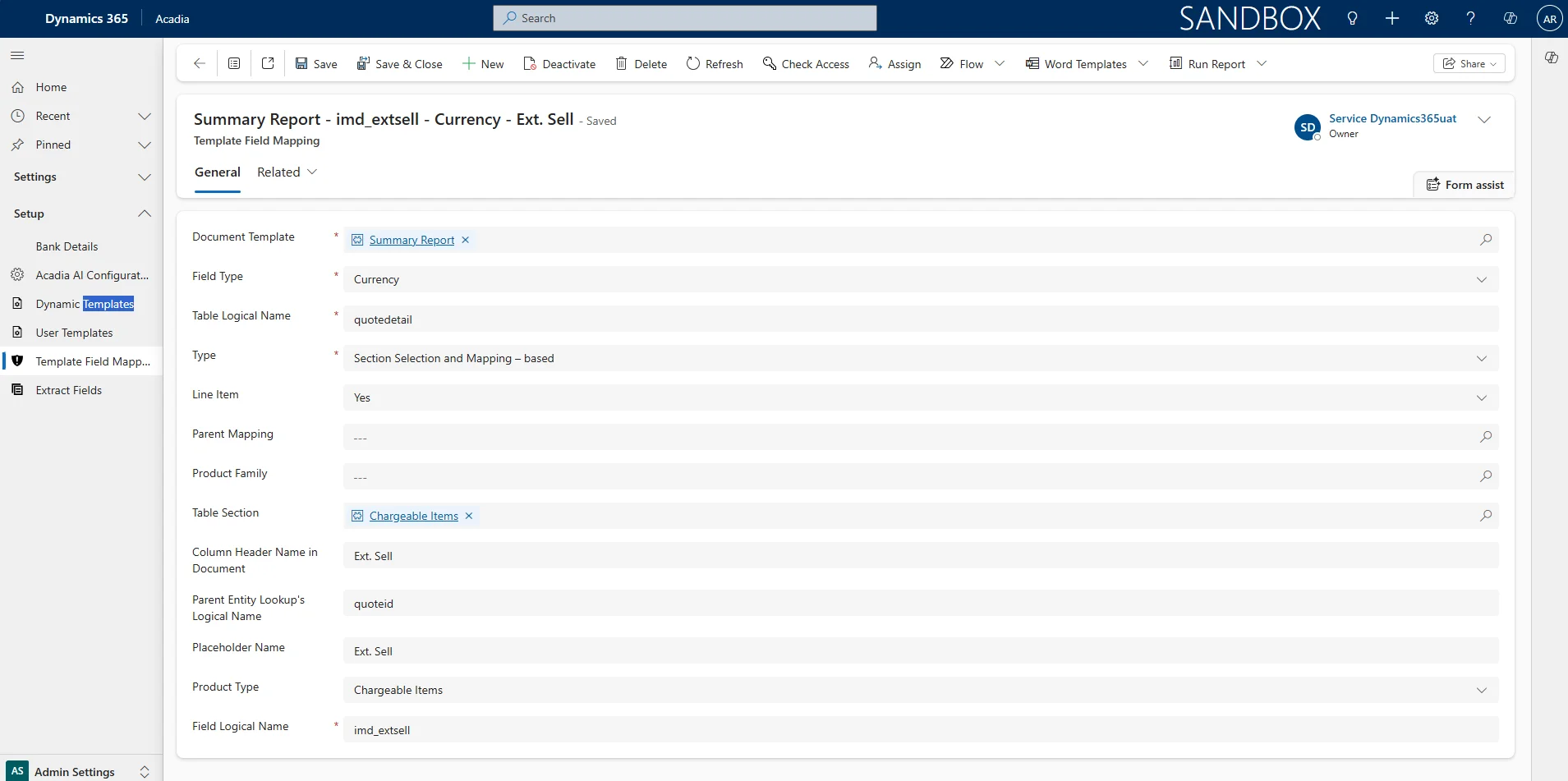
Figure 3. Field mapping configuration screen
Step 3: Create and Customize a User Template
- Create a User Template and link it to the configured Dynamic Template.
-
Customize the User Template by selecting:
- Which sections, tables, or columns to include in the generated document.
- Which parts of the document to exclude based on business needs.
- This provides flexibility to tailor each generated contract or proposal for specific clients or scenarios without modifying the base template.
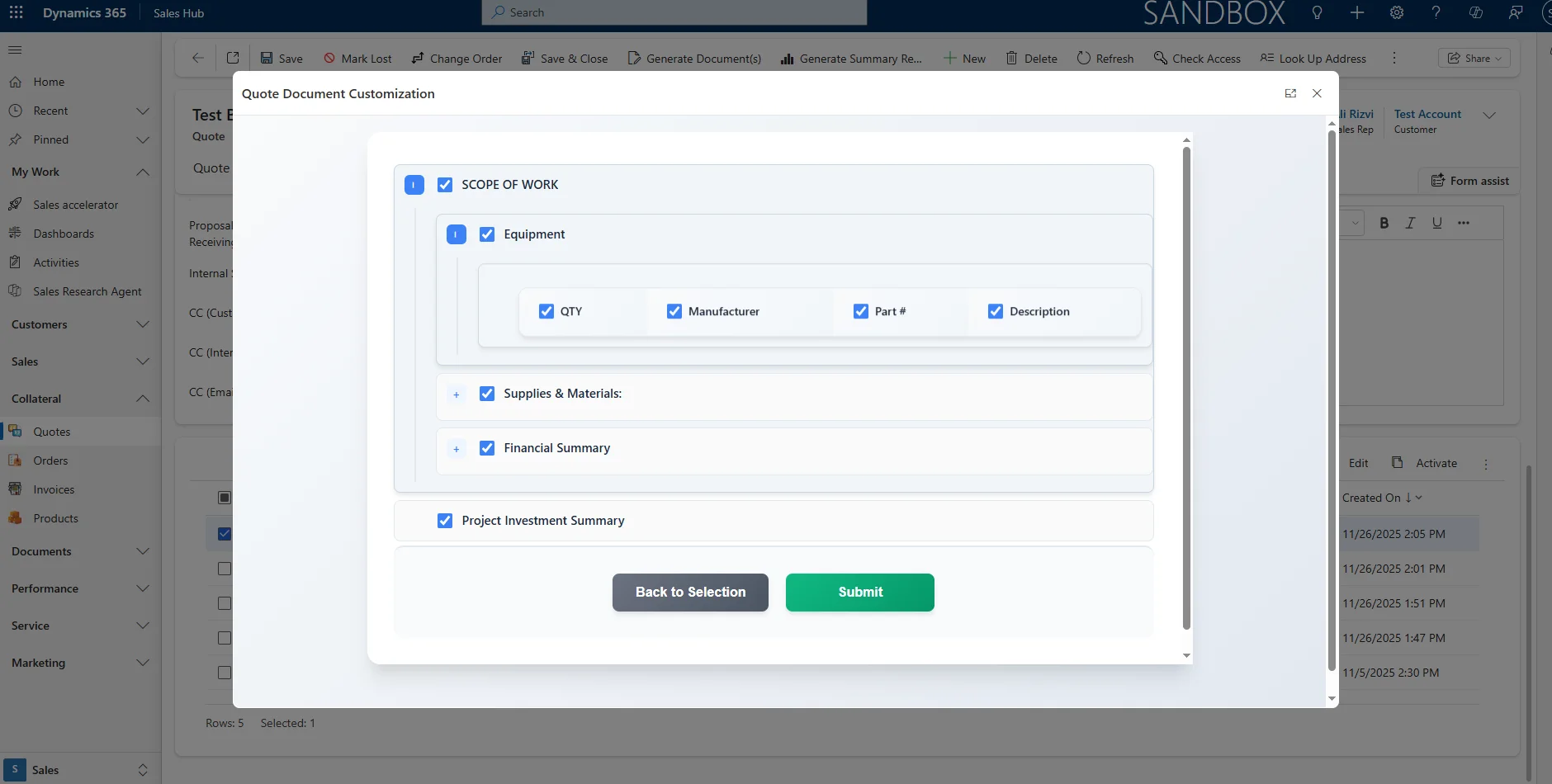
Figure 4. User Template customization screen
Step 4: Generate and Preview the Document from Dynamics 365 Distribution
- Open a Quote record in Dynamics 365 Sales
- Select Generate Document.
- Select the User Template and Continue.
- The system applies mappings, merges line item data, and generates a complete branded proposal.
- Preview and download the document in Word or PDF format, or continue editing in the embedded document editor.
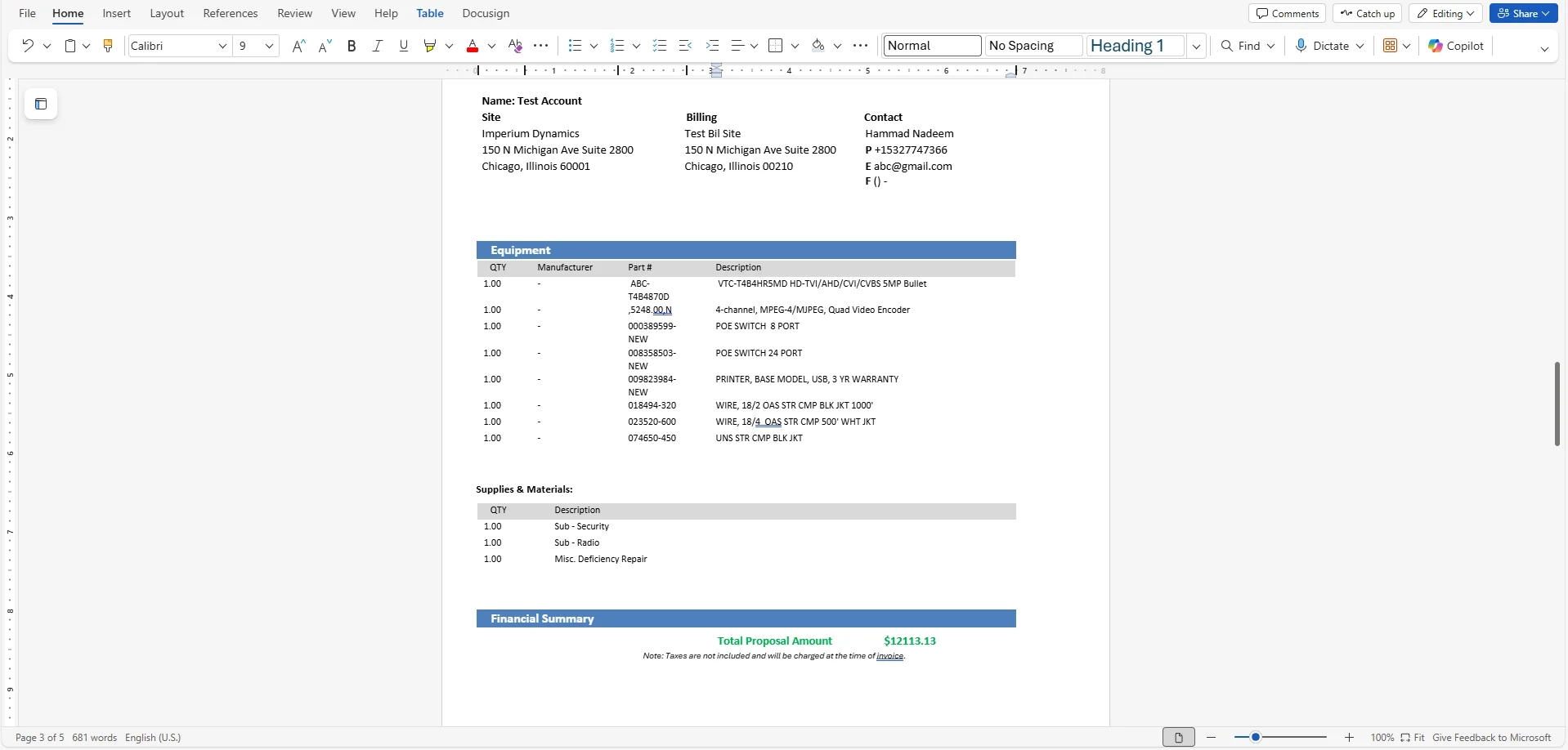
Figure 5. Generated Document for a Sample Quote
Limitations of Word Online and Best Practices for Dynamic Templates
Limitations:
- The Word Online add-in provides limited control for layout adjustments and formatting compared to desktop Word.
- Some custom macros or content controls do not render properly when viewed or edited in Word Online.
- Dynamic field mapping is not supported in headers, footers, or text boxes within Word Online.
Best Practices:
- Use Dataverse relationships effectively for mapping related data such as Quote Line Items.
- Maintain separate template versions for different business units or branding updates.
- Keep placeholder naming consistent and descriptive to simplify field mapping and troubleshooting.
- Test mappings with sample records before enabling templates for organization-wide use.
- For complex layouts or dynamic sections, finalize formatting in local Word before uploading to Acadia or by opening the live SharePoint-hosted template directly in Word Desktop. When opened this way, all edits are saved back to the same SharePoint file automatically, so there is no need to re-upload the template. Acadia also supports creating a new version of the template within the document interface when needed.
Real-World Example: Fire and Security Sector
For a leading Fire and Security company, Acadia was implemented to automate the generation of complex quote and proposal documents directly from Dynamics 365 Sales.
Before Acadia
- Each distribution proposal required 45–60 minutes of manual effort.
- The process involved data extraction from multiple sources including Excel and email.
- Repetitive formatting in Word due to inconsistencies caused delays.
After Implementing Acadia Dynamic Templates
- 10 dynamic document templates were created, each with hundreds of field mappings across proposals and contracts.
-
Mappings covered placeholders for details such as:
- Client names, addresses, emails, and phone numbers.
- Line items, monthly subscription fees, and total proposal amounts.
- The document generation process now takes less than 1 minute.
- Accuracy improved through automated data population from Dataverse.
- Legal and distribution teams collaborate in real time via embedded Word Online.
- The distribution operations team now manages 200+ template-based documents per month, ensuring content consistency and compliance.
Key Takeaways & Resources
Key Takeaways
- Acadia’s Dynamic Template Engine streamlines quote and contract generation directly within Dynamics 365 Sales — eliminating manual data entry and formatting.
- Dynamic Templates and User Templates together enable full control over document sections, field mappings, and layout customization.
- Word Online integration allows real-time collaboration and review without leaving the Dynamics workspace.
- Leveraging Dataverse relationships ensures accurate and scalable data population across Quote (msdyn_quote), Contact (contact), Account (account), and Line Items (quotedetail).
Recommended Resources

Ali Rizvi |


Hammad Nadeem Khan
Posted on: 21 November, 2025