This guide compares Microsoft Copilot Studio and Azure AI to help organizations choose the right platform for building agentic AI agents capable of planning, reasoning, taking actions, and collaborating across systems with varying levels of autonomy. Copilot Studio is ideal for low-code, business friendly automation, and conversational workflows. Azure AI excels for custom models, complex reasoning, and multistep orchestration. Use the included decision framework, architecture comparison, implementation patterns, and case study to align platform choice with business needs, governance requirements, and integration scenarios.
1. Business Context: When to Use Copilot Studio vs Azure AI in the Microsoft Ecosystem
Artificial Intelligence has become a necessity for every single business that operates with different types of consumers. As demand increases for conversational agents, automated reasoning, and generative AI assistance, companies face the challenge of choosing the correct tool for the job. Organizations investing in Microsoft's ecosystem face a critical decision: where should we build our AI agents? With the rise of Copilot Studio and the maturity of Azure AI services, teams are caught between two powerful but fundamentally different platforms.
The core challenge isn't technical capability; both platforms can deliver intelligent agents. The challenge is strategic alignment: choosing the wrong platform leads to technical debt, cost overruns, governance headaches, and frustrated business users.
What This Guide Covers
Key differences between Copilot Studio and Azure AI for enterprise AI solutions
Decision framework to select the right Microsoft AI platform based on complexity, governance, and integration needs
Architecture breakdown: low-code Copilot Studio vs code-first Azure AI
Implementation patterns for business process automation, document generation, and conversational AI
Knowledge base, prompting, and RAG configuration
Integration with Microsoft Teams, Dynamics 365, Power Platform, Fabric and SharePoint
Limitations and best practices for each platform
Case study: document automation workflow using Copilot Studio + Acadia
Cost, governance, and scaling considerations
Who This Impacts
IT Directors & Architects: Need to establish enterprise AI standards and prevent shadow AI
Business Analysts & Functional Consultants: Must deliver solutions that business users can maintain
Developers & Data Engineers: Require flexibility for complex integrations and custom models
Power Platform Administrators: Need governance frameworks that scale across departments
Executive Sponsors: Want ROI clarity and risk mitigation for AI investments
The Decision Gap
Most organizations approach this decision incorrectly. They ask: "Which platform has better features?"
The best AI projects don’t start with “Which Microsoft tool should we use?” They start with questions like:
Who owns the outcome?
What level of control do we need?
How are we grounding responses in reality?
What happens when something goes wrong, and who’s accountable?
Which platform aligns with a governance model and uses case requirements?
A manufacturing company using Copilot Studio for a complex predictive maintenance system requiring custom ML models will hit limitations fast. Conversely, a distribution team using Azure AI for basic lead qualification will waste months and thousands of dollars on over engineered infrastructure.
This blog provides a decision framework, implementation patterns, cost considerations, and a real-world case study from Imperium Dynamics to help you make the right choice.
2. Platform Architecture Comparison: Copilot Studio vs Azure AI
The Platform Philosophy Difference
Understanding the architectural structure of each platform reveals why they serve different purposes.
Copilot Studio: Democratized AI for Business Processes
Copilot Studio operates on a low code, processed first philosophy. It assumes:
Business users should build and maintain agents without developer involvement
AI agents primarily orchestrate existing business processes
Governance happens through Power Platform admin controls
Integration means connecting to Microsoft 365, Dynamics 365, and common SaaS tools
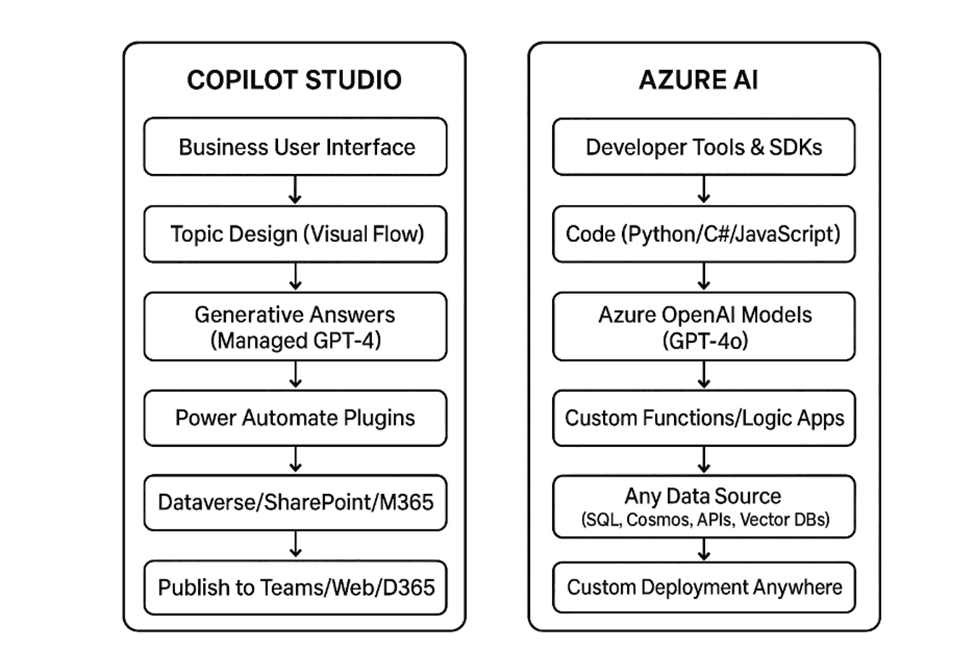
Architecture Components:
Copilot Studio designer (web based, no code interface)
Generative AI orchestration (GPT-4 powered, Microsoft managed)
Power Automate for workflow integration
Dataverse for structured data storage
Pre built connectors (400+ available)
Publishing channels (Teams, websites, Dynamics 365 apps, Salesforce Integration and much more)
Prerequisites:
Power Platform environment with Dataverse
Copilot Studio license or Dynamics 365 license with Copilot features
Basic understanding of business process design
No Azure subscription required
Azure AI: Enterprise Grade AI for Custom Intelligence
Azure AI operates on a code enabled, flexibility first philosophy. It assumes:
Developers and data scientists control agent behavior
AI agents may require custom models, fine tuning, or advanced orchestration
Governance happens through Azure Policy, Entra ID, and RBAC
Integration with enterprise systems is achieved via APIs, SDKs, or event driven services.
Architecture Components:
Azure AI Studio (development environment)
Azure OpenAI Service (GPT-4o, GPT-4 Turbo, embeddings)
Azure AI Search (vector database for RAG)
Azure Functions or Logic Apps (orchestration)
Azure API Management (secure API gateway)
Custom deployment options (web apps, mobile apps, APIs)
Prerequisites:
Azure subscription with OpenAI access
Developer/architect expertise (Python, REST APIs, authentication)
Understanding of cloud architecture patterns
DevOps capabilities for CI/CD
Simplified Architecture Comparison
Integration with Microsoft Fabric
As organizations embrace agentic AI, the quality, governance, and accessibility of enterprise data become as critical as the AI platform itself. Microsoft Fabric serves as the unified data foundation for both Copilot Studio agents and Azure AI agentic systems.
Rather than viewing Fabric as an alternative to Copilot Studio or Azure AI, organizations should recognize it as the essential data layer that powers intelligent behavior, reasoning, and contextual awareness across both platforms.
Copilot Studio + Microsoft Fabric
Copilot Studio integrates with Microsoft Fabric primarily through Power Platform and Microsoft 365 services, enabling several key capabilities.
Agents can access Fabric OneLake and Lakehouse data through Power BI semantic models, Dataverse virtual tables, and Power Automate flows. This allows them to answer business questions grounded in governed datasets, trigger workflows based on data driven insights, and reference curated analytics instead of raw data.
In this architecture, Copilot Studio agents function as task oriented or supervised agents, leveraging Fabric to provide a single source of truth, governed business ready data, and enterprise grade security with full lineage tracking.
This approach excels when: business users need conversational access to analytics; agent actions follow predefined patterns, and low code governance is a priority.
Azure AI + Microsoft Fabric
Azure AI integrates with Fabric at a deeper and more flexible level, making it the preferred foundation for fully autonomous agentic AI systems.
Enterprise implementations typically involve Azure AI agents querying Fabric Lakehouse's, Warehouses, and Event streams directly. Fabric serves as long term memory for agents, a context store for RAG (Retrieval Augmented Generation) pipelines, and the data source for multistep reasoning and planning. These systems combine Azure OpenAI models, custom ML models, and Fabric hosted data pipelines to create sophisticated AI capabilities.
The result is agents that can reason across historical and real time data, autonomously decide which tools or workflows to invoke, and continuously learn from enterprise data signals.
Azure AI + Fabric is ideal when: agents require autonomy and orchestration capabilities; data volumes are large or streaming, and advanced analytics with custom models are required.
Decision Guidance: Where Fabric Fits
Scenario | Recommended Stack |
Conversational analytics in Teams | Copilot Studio + Fabric + Power BI |
Workflow automation using governed data | Copilot Studio + Fabric + Power Automate |
Multi-step agent reasoning | Azure AI + Fabric |
RAG over large enterprise datasets | Azure AI + Fabric Lakehouse |
Predictive + generative AI agents | Azure AI + Fabric + Custom ML |
Key Takeaway
Microsoft Fabric is not a competing platform in the Copilot Studio versus Azure AI decision; it is the data backbone that enables agentic AI across both platforms.
Copilot Studio + Fabric delivers controlled, business friendly agent experiences with strong governance. Azure AI + Fabric enables fully agentic, data driven AI systems capable of operating autonomously at enterprise scale.
Organizations that strategically align Fabric with their AI platform choice gain better governance, higher data trust, and the ability to scale agentic AI initiatives faster and more effectively.
3. Selecting the Right Platform: Copilot Studio or Azure AI?
Rather than walking through generic setup steps, let's focus on decision criteria that matter in real implementations.
Decision Matrix
Criteria | Use Copilot Studio | Use Azure AI |
Primary Users | Business analysts, functional consultants, citizen developers | Developers, data scientists, AI engineers |
Complexity | Conversational flows, FAQ bots, process automation | Multistep reasoning, custom ML, complex orchestration |
Data Sources | Microsoft 365, Dynamics 365, common SaaS | Any data source, custom databases, real time streams |
Customization | Pre-built actions, limited code | Full control over prompts, models, and logic |
Time to Deploy | Days to weeks | Weeks to months |
Maintenance | Business users can modify | Requires developer updates |
Cost Model | Per user or per tenant licensing | Consumption based (tokens, compute, storage) |
Governance | Power Platform DLP policies | Azure Policy, network security, RBAC |
Use Case Examples | HR helpdesk, distribution qualification, IT support tickets | Predictive maintenance, document intelligence, custom analytics |
Implementation Pattern 1: Copilot Studio for Business Process Automation
Best for: Customer service, internal helpdesks, knowledge management, simple workflows
Implementation Approach:
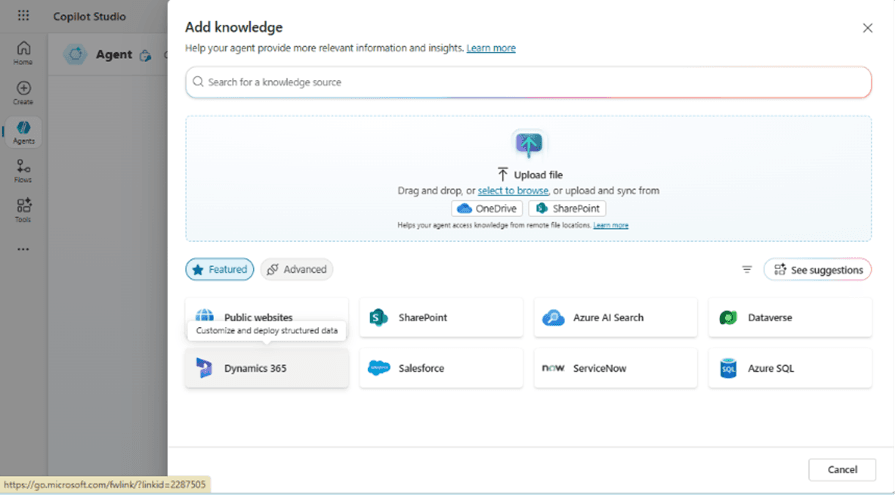
Define Knowledge Base
Upload documents to SharePoint, Dataverse, Copilot Knowledge Base, Website or any other means of knowledge base
Configure generative answers with 3-5 authoritative sources
Set content refresh schedules
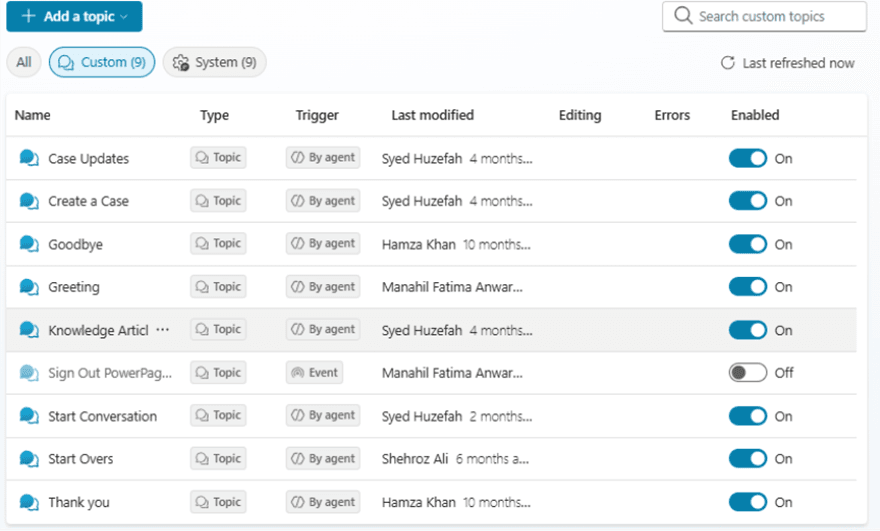
Design Conversation Topics
Create 5-10 core topics based on user intent
Use generative AI for fallback responses
Route complex queries to human agents
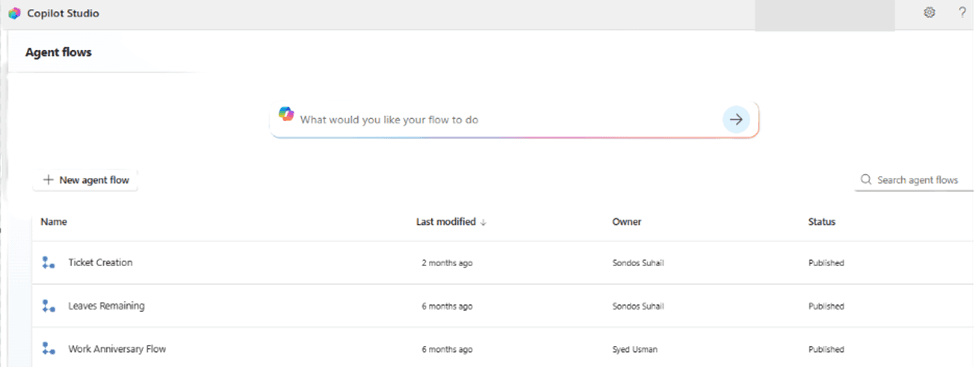
Integrate Business Actions
Connect Power Automate flows for ticket creation, approvals, data updates
Use pre-built connectors (ServiceNow, Salesforce, SAP)
Configure authentication (OAuth, API keys)
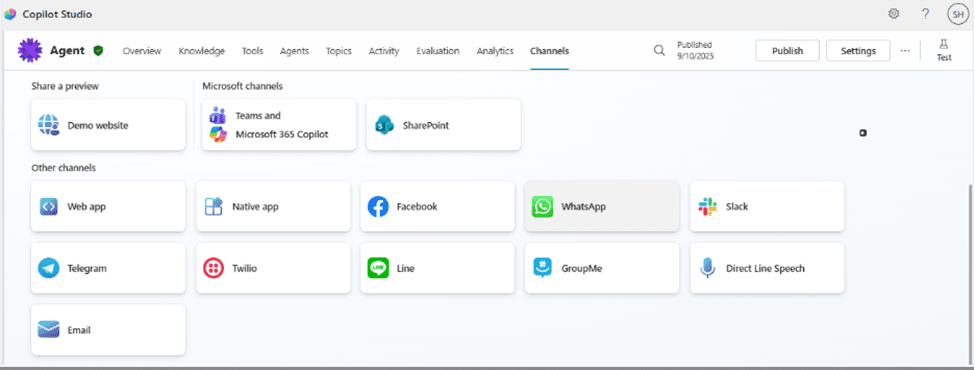
Deploy and Monitor
Publish to Teams for internal users
Embed in Dynamics 365 Customer Service
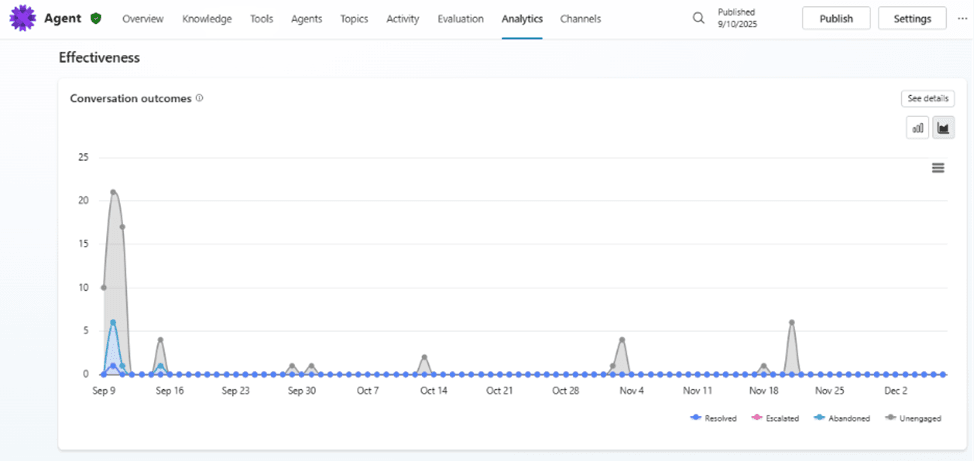
Monitor analytics in Copilot Studio dashboard
Example Prompt Configuration
System Instructions:
You are an IT helpdesk assistant for Imperium Dynamics. Answer questions about:
- Password resets (guide users to self-service portal)
- Software access requests (create ServiceNow ticket via flow)
- Common technical issues (reference KB articles)
Always be professional and concise. If uncertain, escalate to human agent.
Implementation Pattern 2: Azure AI for Custom Intelligence
Best for: Predictive analytics, document processing at scale, custom reasoning, multi modal AI
Implementation Approach:
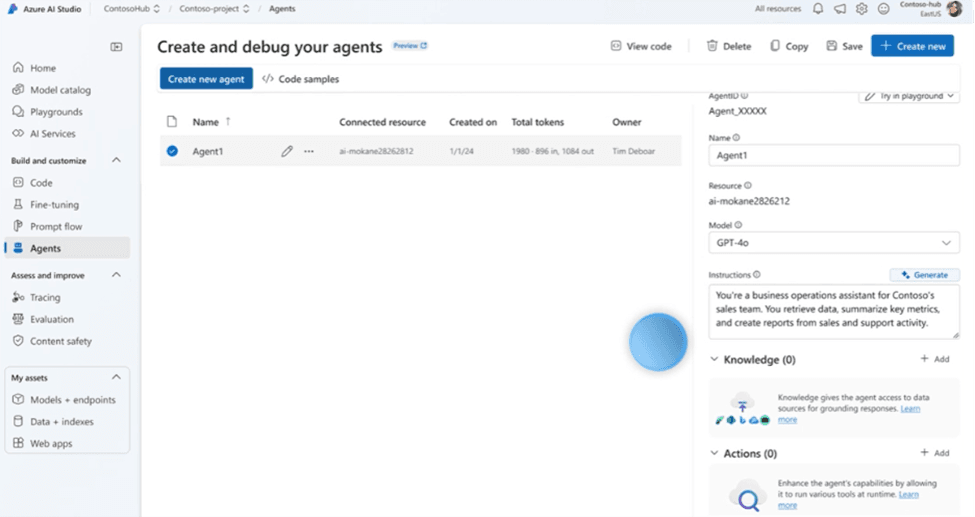
Design Agent Architecture
Define agent capabilities (function calling, RAG, reasoning)
Create system prompts that enforce business rules
Configure model parameters (temperature, max tokens)
Build Knowledge Layer
Index documents in Azure AI Search
Generate embeddings (text embedding 3 large)
Implement semantic ranking and filters
Develop Custom Functions
Create Azure Functions for business logic
Integrate with enterprise systems via APIs
Implement error handling and retry logic
Deploy Securely
Use Managed Identity for authentication
Implement rate limiting in API Management
Configure monitoring with Application Insights
Example Function Definition:
{
  "type": "function",
  "function": {
    "name": "get_equipment_diagnostics",
    "description": "Retrieves diagnostic data for equipment",
    "parameters": {
      "type": "object",
      "properties": {
        "equipment_id": {"type": "string"},
        "date_range": {"type": "string"}
      },
      "required": ["equipment_id"]
    }
  }
}
Implementation Pattern 3: Hybrid Architecture
Best for: Enterprise deployments requiring both user-friendly interfaces and advanced capabilities
Architecture Flow:
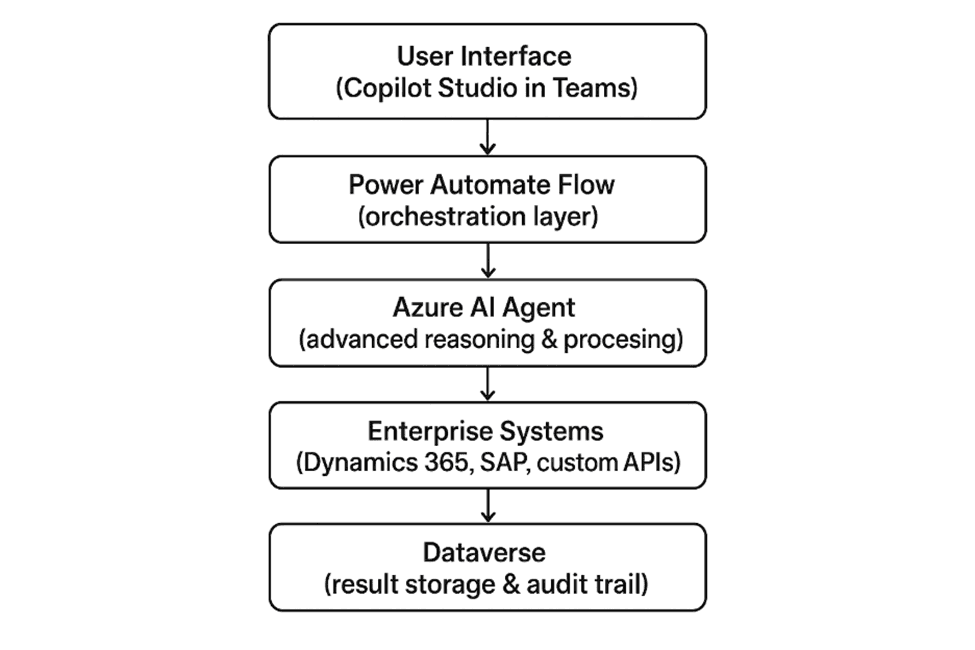
When to Use Hybrid:
You need Teams/Dynamics 365 integration but require custom ML models
Business users must maintain conversational flows but complex logic needs developer control
Governance requires Power Platform DLP but workloads need Azure compute
You want to migrate gradually from one platform to another
4. Limitations and Best Practices for Copilot Studio and Azure AI
Copilot Studio: What to Watch For
Limitations:
Generative answers limited to 3,000 characters per response
Cannot fine tune underlying models
Power Automate flow execution timeout (varies by plan, typically 30-60 seconds for synchronous calls)
Limited support for complex multi-turn conversations with extensive context
No direct access to advanced model parameters
Best Practices:
Keep topics focused (one intent per topic)
Use variables to maintain conversation state
Implement fallback topics for unrecognized inputs
Test extensively with real user queries before production
Monitor conversation analytics weekly to identify gaps
Configure environment level DLP policies before building agents
Azure AI: What to Watch For
Limitations:
Requires Azure OpenAI service approval (not instant)
Token costs can escalate quickly without proper monitoring
Complexity requires ongoing developer maintenance
No built in conversation designer (you build everything)
Prompt injection and security must be implemented manually
Best Practices:
Implement prompt guardrails and content filtering
Use semantic caching to reduce token costs
Monitor token consumption with budget alerts
Version control all prompts and configurations
Test function calling extensively before production
Implement proper authentication and authorization layers
Use Azure AI Studio's evaluation features for quality testing
5. Real-World Example: Imperium Dynamics – Document Automation with Copilot Studio & Acadia
The Challenge:
A professional services client needed a streamlined, error free, and fully automated way to generate business critical documents such as NDAs and Statements of Work (SOWs). Their existing process relied heavily on:
Manual editing
Copy pasting from old documents
Searching multiple storage locations for templates
This resulted in:
Slow turnaround time
Human errors in contractual information
Lack of standardization across teams
No centralized governance or version control
The client wanted a solution embedded directly into Microsoft Teams, their primary collaboration environment, while leveraging their existing investment in Microsoft 365 and Power Platform.
The Solution: Copilot Studio Integrated with Acadia
Imperium Dynamics implemented a Copilot Studio powered chatbot fully integrated into Teams and connected to Acadia, our signature document management platform.
Acadia is a robust document management solution built on the Power Platform and enhanced with GPT-4 and Azure OpenAI. It streamlines the entire document's lifecycle, from creation, through approval, storage, and collaboration, using dynamic templates and intelligent automation.
Why Copilot Studio?
This use case required:
A Teams native conversational experience
Fast, structured document generation
Business user friendly flows
Integration with Power Platform and SharePoint
Zero need for custom AI infrastructure
Copilot Studio provides the ideal low-code interface to orchestrate Acadia’s backend capabilities while keeping everything inside the Microsoft 365 ecosystem.
Why Not Azure AI?
While Azure AI is powerful, it was not the right fit for this specific scenario.
Using Azure AI alone would have required:
Building a custom frontend or Teams app
Designing and hosting APIs for the chatbot
Implementing authentication, routing, and security layers
Building a full RAG pipeline to fetch document templates
Custom document assembly logic
Azure Functions or API Management for orchestration
This meant:
Higher development cost
Longer deployment timelines
Increased DevOps complexity
Unnecessary engineering for a simple, structured workflow
Copilot Studio, on the other hand:
Integrates natively with Teams
Connects directly to SharePoint, Power Automate, and Dataverse
Provides a conversational interface out-of-the-box
Requires no custom UI or backend
Enables rapid low-code development
Allows business users to maintain flows without developers
Since the client only needed structured field capture + standardized document generation, Copilot Studio was the correct platform, not Azure AI.
How the Solution Works:
1. Teams Integrated Chatbot Experience
The user interacts with the chatbot inside Microsoft Teams.
The bot welcomes the user and prompts them to select the document type (e.g., NDA or SOW).
2. Dynamic Template Retrieval
The chatbot fetches the correct template stored in Acadia.
Each template includes dynamic placeholders mapped to user provided inputs.
3. Guided Form Filling
Copilot Studio walks the user through all required fields.
Each input is validated and captured cleanly.
A final confirmation summary ensures accuracy before generation.
4. Automated Document Generation
Once confirmed, the chatbot:
Retrieves the selected template from Acadia
Performs real time field mapping
Generates a professional, fully formatted document within seconds
5. Delivery & Distribution
The chatbot immediately provides:
A SharePoint link to the generated document
A direct download link
A link to open the document in Acadia
An option to send the document directly to the client from Teams
Results:
The automated Copilot Studio + Acadia workflow delivered measurable impact:
Zero manual drafting
100% accuracy via template driven field mapping
No human errors in key contractual data
Document creation time reduced from hours to seconds
Centralized governance through Acadia and SharePoint
Seamless adoption due to the Teams native experience
Key Success Factors:
Utilized existing Microsoft 365 investments
Teams' integration enabled quick user onboarding
Acadia’s dynamic templates ensured consistency
Copilot Studio delivered a clean conversational experience
No heavy Azure infrastructure was required; simple, scalable, low-code architecture
5.1 Real-World Example: Imperium Dynamics – Intelligent Hiring Automation with STAR using Azure AI
The Challenge:
A mid-to-large enterprise struggled with inefficiencies across its recruitment lifecycle due to high application volumes and fragmented hiring workflows. Their existing process relied heavily on:
Manual resume screening
Keyword based shortlisting with low accuracy
Repetitive coordination for interview scheduling
Disconnected ATS, email, and calendar systems
This resulted in:
Long time-to-hire cycles
Missed high quality candidates due to manual bias or oversight
Inconsistent candidate evaluation across teams
High operational burden on HR and talent acquisition teams
A poor candidate experience caused by slow response times
The organization needed a scalable, intelligent hiring solution capable of understanding unstructured resume data, performing accurate candidate matching, and automating downstream processes, while maintaining enterprise grade security and compliance.
The Solution: STAR – Powered by Azure AI
Imperium Dynamics implemented STAR, an enterprise hiring automation platform built using Azure AI to modernize and accelerate the recruitment process.
STAR uses Azure AI capabilities to automate key hiring workflows, including resume parsing, candidate-to-role matching, and interview scheduling. By replacing manual and rule-based processes with intelligent automation, STAR significantly reduces time-to-hire while improving hiring quality.
The platform is designed with a cloud native, API first architecture, enabling seamless integration with existing Applicant Tracking Systems (ATS), HR platforms, email services, and calendars.
Why Azure AI?
This hiring use case required:
Advanced natural language processing for unstructured resumes
Semantic understanding beyond keyword matching
Intelligent candidate scoring and ranking
Secure handling of sensitive candidate data
Custom orchestration across multiple enterprise systems
Scalability to support fluctuating hiring demands
Azure AI was selected because it provides:
Azure OpenAI for deep resume understanding and reasoning
Azure AI Search for semantic candidate retrieval
Custom AI pipelines for role-based scoring and evaluation
Azure Functions and Logic Apps for workflow orchestration
Enterprise grade security, RBAC, and compliance controls
Azure AI enabled full control over model behavior, orchestration logic, and integration patterns, making it the ideal foundation for STAR.
Why Not Copilot Studio?
While Copilot Studio excels at structured, conversational workflows, it was not suited for this scenario.
Using Copilot Studio would have introduced limitations around:
Advanced resume parsing and semantic analysis
Custom candidate ranking algorithms
Multi model AI orchestration
High volume integration with external ATS platforms
Fine grained control over AI decision logic
This hiring use case required intelligent reasoning over unstructured data, not guided form-based interactions, making Azure AI the correct architectural choice.
How the Solution Works:
1. Intelligent Resume Ingestion & Parsing
Candidates submit resumes in multiple formats (PDF, DOCX, etc.)
STAR uses Azure AI to extract:
Skills, experience, and education
Role relevance and seniority indicators
Contextual meaning rather than simple keywords
2. AI-Driven Candidate Matching
Parsed resumes are semantically compared against job descriptions
Candidates are scored and ranked based on:
Skill alignment
Experience relevance
Role-specific weighting logic
Recruiters receive a prioritized shortlist within minutes
3. Automated Interview Scheduling
STAR integrates with Outlook, Teams, and enterprise calendars
Available time slots are identified automatically
Interviews are scheduled without manual coordination
Candidates receive automated confirmations and reminders
4. Recruiter & Hiring Manager Experience
Recruiters access STAR through dashboards or integrated HR tools
AI generated insights explain why candidates are recommended
Hiring managers focus only on high quality, pre-vetted candidates
Results:
The STAR implementation using Azure AI delivered measurable impact:
Time-to-hire reduced by up to 60%
Manual resume screening eliminated
Improved accuracy in candidate-role matching
Consistent and standardized shortlisting
Automated interview coordination
Scalable hiring during peak recruitment cycles
Enhanced candidate experience through faster engagement
Key Success Factors:
Azure AI enabled deep semantic understanding of resumes
Custom orchestration allowed precise control over hiring logic
Cloud-native design ensured scalability and security
Seamless integration with existing HR ecosystems
STAR delivered enterprise-grade intelligence; not just automation
Strategic Takeaway:
When the challenge involves unstructured data, complex reasoning, and enterprise-scale orchestration, platforms like STAR built using Azure AI are the right choice.
Copilot Studio simplifies structured, conversational workflows.
Azure AI powers intelligent, decision-driven systems.
STAR demonstrates how Imperium Dynamics leverages Azure AI to transform hiring from a manual process into a scalable, AI-driven decision platform.
6. Key Takeaways and Resources for Copilot Studio and Azure AI
Decision Summary
Choose Copilot Studio when:
Business users will maintain the agent
Primary use case is conversational workflows
You need fast deployment (days to weeks)
Integration is primarily Microsoft 365/Dynamics 365
Governance through Power Platform is sufficient
Choose Azure AI when:
You need custom models or fine-tuning
Use case requires complex reasoning or multi-step orchestration
Data sources are diverse and require custom integration
You have dedicated developers/data scientists
You need full control over prompts, models, and architecture
Use Hybrid when:
You need both user-friendly interfaces and advanced capabilities
Enterprise scale requires separation of concerns
You want to leverage existing Power Platform investments while adding AI capabilities
Your roadmap includes both simple and complex agent requirements
Cost Considerations
Cost Factor | Copilot Studio | Azure OpenAI |
Licensing | Included in with Copilot for Microsoft 365 or Pay-as-you-go | Pay-as-you-go via Azure subscription |
Model Usage | credits | Billed per token, model, and compute |
Storage | Dataverse, SharePoint, etc | Azure Blob, Data Lake, SQL |
Scaling | Limited by Power Platform quotas | Fully scalable with Azure infrastructure |
Maintenance | Managed by Microsoft | User-managed (updates, scaling) |
Conclusion
Both Microsoft Copilot Studio and Azure AI are powerful platforms,but they shine in different areas:
Use Copilot Studio when you need fast, user-friendly conversational agents integrated with Microsoft 365.
Use Azure AI when you need deep AI capabilities, custom models, and enterprise-grade orchestration.
Use both together to build end-to-end intelligent systems that combine ease of use with powerful backend intelligence.
By aligning the right tool with the right task, enterprises can unlock new levels of productivity, automation, and client satisfaction.
Recommended Resources:

Muhammad Arsal Naveed |


Syed Huzefah |
Posted on: 13 January 2026