
Learn how to design reliable, scalable, and maintainable Dynamics 365 and Dataverse integrations with external systems using alternate keys, change tracking, auditing, API-aware sync patterns, monitoring, and governance best practices.
-
Product Area:
Dynamics 365
Dataverse
Power Platform Integrations
-
Tags / Keywords:
Dynamics 365 integration best practices
Dataverse integration
Dynamics 365 external systems
Dataverse change tracking
Alternate keys in Dataverse
Dynamics 365 API integration
Power Platform integration architecture
Dynamics 365 synchronization
Dataverse auditing
Integration troubleshooting
Who this is for
This guide is for Dynamics 365 solution architects, Dataverse developers, integration engineers, technical leads, and admins responsible for connecting Dynamics 365 with ERP, HR, billing, field service, or custom line-of-business systems.
1. Context & Problem Statement
Dynamics 365 and Dataverse integrations with external systems are essential in modern enterprise architecture. Organizations commonly connect CRM data with ERP, HR, billing, field service, finance, and custom line-of-business applications. While Microsoft provides strong APIs and integration tooling, poorly designed integrations remain a leading cause of duplicate records, failed synchronizations, performance issues, and loss of trust in business data.
Common challenges include:
Records created without proper ownership or audit history
Failed syncs due to required fields or character limits
Lookup resolution failures across systems
Plug-ins triggering repeatedly and slowing down environments
No clear way to reconcile records between systems
These issues directly impact system admins, solution architects, developers, and business users, especially in environments where integrations run frequently or at scale.
This guide explains the most important Dynamics 365 integration best practices for teams designing Dataverse integrations with external systems. It focuses on architecture decisions, data ownership, alternate keys, change tracking, auditing, troubleshooting, plug-in performance, and long-term maintainability.
2. Architecture & Setup Overview
-
High-Level Integration Model
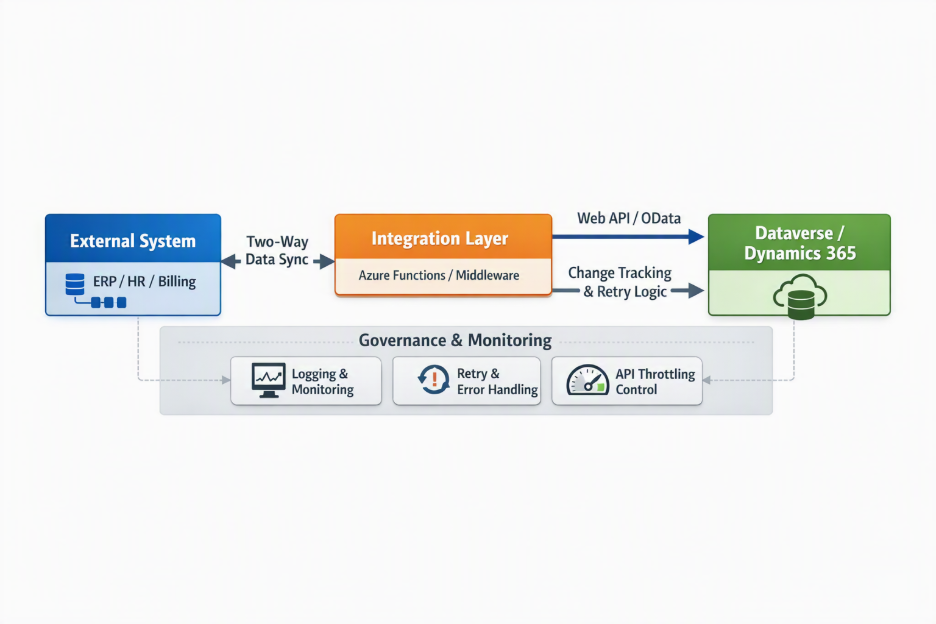
Most enterprise integrations with Dynamics 365 follow one (or more) of these patterns:
One-way sync (External System → Dynamics 365)
Two-way sync (External System ↔ Dynamics 365)
Event-driven sync (near real-time)
Batch-based sync (scheduled)
-
Key Components
Dataverse tables (standard and custom)
Web API / OData endpoints
Integration middleware (Azure Functions, Logic Apps, Power Automate, iPaaS tools)
Custom plug-ins and flows
Integration users / service principals
Monitoring & logging layer
-
Prerequisites
Proper Dataverse security roles for integration users
API limits understood and documented
Clear ownership of data across systems
Change tracking enabled on integration tables
Non-production environments for testing sync behavior
Before writing a single line of code, teams should agree on data ownership, sync direction, cadence, and failure handling.
3. Step-by-Step Implementation Best Practices
This section covers the core best practices for Dynamics 365 and Dataverse integrations with external systems, including system-of-record design, alternate keys, external identifiers, required fields, lookup resolution, plug-in optimization, auditing, synchronization cadence, and change tracking.
-
Define Integration Direction and Ownership Clearly
If data flows one way from an external system to Dynamics:
Decide whether records can also be created or modified inside Dynamics
Avoid accidental overwrites by clearly defining the system of record
If Dynamics is not the source of truth, restrict user edits or clearly flag externally managed fields.
-
Use Custom Created On / Modified On Fields
Dataverse system fields (Created On (
createdon), Modified On (modifiedon)) cannot be set directly via API.Best practice:
Create custom fields such as:
Created On (
imd_externalcreatedon)Modified On (
imd_externalmodifiedon)
Populate these from the external system
Use the same pattern if records can also originate in Dynamics
This preserves accurate audit timelines without fighting platform constraints.
-
Handle Owner and Modified By Fields Carefully
External systems usually cannot set:
Owner (
ownerid)Created By (
createdby)Modified By (
modifiedby)
Recommended approach:
Create custom fields like:
External Owner (
imd_externalowner)External Modified By (
imd_externalmodifiedby)
Populate these with user identifiers from the external system
Use plug-ins or background jobs to map them to Dynamics users if needed
Never hardcode owners without business approval—it breaks reporting and security assumptions.
-
Avoid Setting Polymorphic and Party List Fields Directly
Fields such as:
Regarding (
regardingobjectid)Party lists (To, CC, Required Attendees)
Polymorphic lookups
are not reliably settable from external systems.
Best practice:
Create custom lookup or text fields
Populate them during integration
Resolve and set actual polymorphic fields using plug-ins or async processes inside Dynamics
This avoids API errors and unpredictable behavior.
-
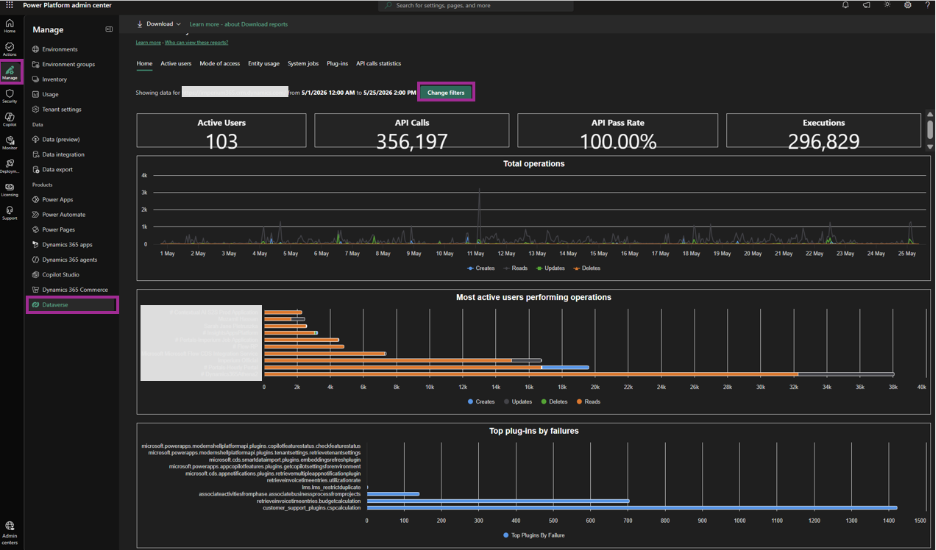
Define Sync Cadence and Respect API Limits
Integration frequency must balance:
User activity
Data freshness requirements
API throttling limits
Recommendations:
Avoid syncing during peak user hours where possible
Monitor API usage proactively
Throttle batch sizes
Implement retry logic with backoff
Also monitor plug-ins running on integration tables, as excessive triggers can destabilize environments.
-
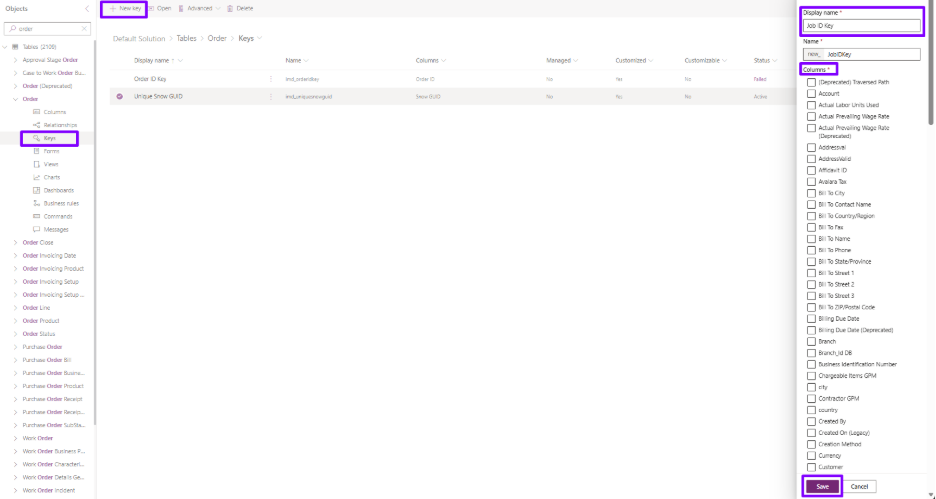
Use Alternate Keys and External Identifiers
GUIDs alone are not enough for robust integrations.
Best practice:
Create alternate keys using external system identifiers
Use them for upserts instead of lookups by name or free text
Example: External System ID → Alternate Key in Dataverse
Using alternate keys in Dataverse makes integrations more reliable because external systems can perform upserts against stable business identifiers instead of depending only on environment-specific GUIDs. This helps prevent duplicates, improves record matching, and simplifies reconciliation between Dynamics 365 and external systems. In some designs, plug-ins can also generate additional integration GUID fields on record creation when cross-system traceability is required.
-
Store External Database IDs for Lookup Resolution
When syncing relational data:
Create columns to store foreign database IDs
Use them to resolve lookups in Dynamics
This is critical when:
External systems don't expose GUIDs
Relationships must be rehydrated reliably
-
Handle Required Fields Strategically
Sometimes fields are required in Dynamics but not required in the external system.
Options:
Set default values (1, Unknown, N/A)
Use null-equivalent values where supported
Avoid adding unnecessary steps for business users
The goal is to keep integrations seamless without polluting UX.
-
Enforce Character Limits Early
Character overflow is a silent integration killer.
Best practice:
Validate field lengths before insert/update
Truncate safely if required
Keep schema definitions aligned across systems
This avoids failed syncs and partial data loads.
-
Document Everything Before You Build
Before implementation:
Finalize field mappings
Define transformation rules
Document ownership, sync direction, and cadence
This documentation becomes essential during:
Support
Enhancements
Team transitions
-
Implement Custom Logic for User Lookups
User models vary widely across systems.
Best practice:
Define how external users map to User (
systemuser) or Team (teams)Use email, UPN, or external IDs consistently
Centralize this logic in plug-ins or services
-
Filter Records When One Table Serves Multiple Use Cases
If one table integrates with multiple external tables:
Define filtering rules (type, category, flags)
Make required fields conditional based on type
Enforce data integrity using validation logic
This avoids mixing incompatible records in a single table.
-
Optimize Plug-ins with Filtering and Null Handling
Poorly written plug-ins can cripple performance.
Best practices:
Use filtering attributes
Add strict null checks
Exit early when integration fields are unchanged
Avoid triggering plug-ins unnecessarily
The same applies to Power Automate flows.
-
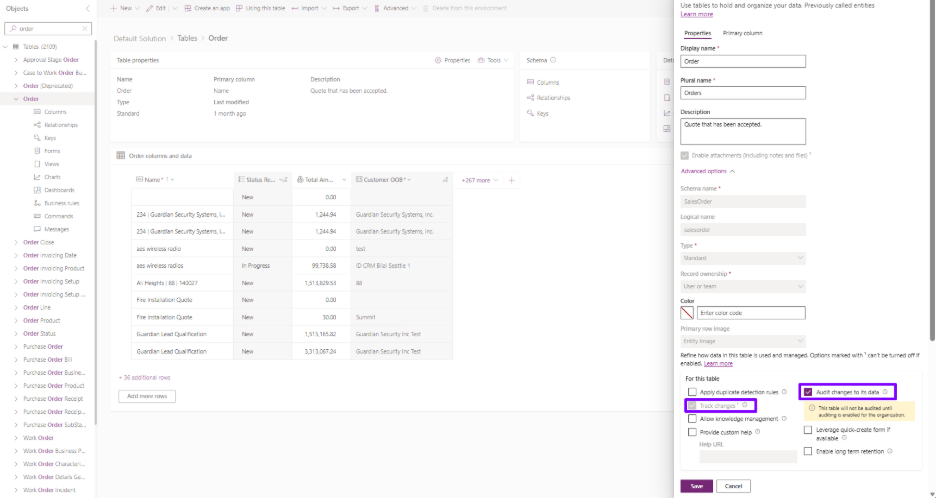
Enable Change Tracking on Integration Tables
Change tracking:
Improves incremental sync performance
Reduces payload sizes
Enables efficient delta-based integrations
This should be enabled on all integration tables unless there's a strong reason not to. For tables that are especially prone to synchronization issues, also enable auditing on the most important integration columns so teams can trace whether the original values were written correctly when the record was created or whether a later integration update cleared or changed them unexpectedly.
-
Add a Custom Automation Logging Field
Add a custom field on integrated tables to record which automation, flow, plug-in, or integration process last updated the record. This gives support teams immediate visibility into the most recent updater and makes it much easier to debug whether a specific automation introduced the issue.
-
Plan for Additional GUID Fields in Two-Way Integrations
Create extra GUID columns to track cross-system IDs
Ensure both systems can reference each other reliably
This avoids circular updates and duplicate records.
4. Limitations & Best Practices Summary
-
Known Limitations
System audit fields are not externally writable
Polymorphic fields require internal resolution
API throttling can affect large-scale syncs
-
Best Practices
Treat integrations as first-class architecture components
Monitor performance continuously
Build for failure, retries, and reconciliation
Keep users insulated from integration complexity
5. Real-World Example
In one of Imperium Dynamics' enterprise implementations, Dynamics 365 was integrated with multiple upstream operational systems feeding customer, contract, and transaction data.
By:
Introducing alternate keys
Separating external audit fields
Sequencing syncs correctly
Optimizing plug-ins with filtering and null handling
The client achieved:
35% reduction in sync failures
Improved system responsiveness during peak hours
Cleaner data ownership and auditability
This approach is now a standard pattern across Imperium's integration-heavy solutions.
6. Key Takeaways & Resources
-
Key Takeaways
Integration design is as important as business logic
Never rely solely on GUIDs for cross-system syncing
Polymorphic fields require internal handling
Plug-in optimization directly impacts system stability
Documentation prevents long-term integration debt
-
Resources
Frequently Asked Questions
What is the best way to integrate Dynamics 365 with external systems?
The best approach is to define the system of record first, choose the right sync pattern, use alternate keys for upserts, enable change tracking where appropriate, and build for retries, monitoring, and reconciliation from the start.Why are alternate keys important in Dataverse integrations?
Alternate keys let external systems identify Dataverse records using business identifiers instead of GUIDs, which helps prevent duplicates, simplifies upserts, and makes cross-system reconciliation easier.When should you use change tracking in Dataverse?
Use change tracking when you need incremental synchronization. It reduces payload size, improves performance, and helps external systems detect only the rows that were added, updated, or deleted since the last sync.How do you troubleshoot Dynamics 365 integration issues more effectively?
Start by enabling change tracking on integration tables, auditing key columns, and adding custom fields that store external IDs, source timestamps, and the automation or process that last updated the record. This makes it easier to determine whether the issue started at record creation, during mapping, or during a later update.Should you use one-way sync or two-way sync for Dynamics 365 integrations?
Use one-way sync when one system clearly owns the data and downstream consistency is the priority. Use two-way sync only when both systems must update shared data and you have clear ownership rules, conflict handling, external IDs, and safeguards against circular updates.What causes performance problems in Dataverse integrations?
Common causes include oversized payloads, excessive plug-in execution, poor retry design, missing filtering attributes, high-frequency sync jobs during peak hours, and ignoring API throttling limits. Performance improves when integrations use delta-based synchronization, tuned batch sizes, monitoring, and efficient plug-in logic.

Ali Rizvi |

Posted on: 18 July 2026