A Technical Deep Dive for Solution Architects, D365 Contact Center Administrators, Customer Service Leaders, and Power Platform Teams
TLDR Summary
Many organizations still depend on static IVRs, manual case classification, and disconnected chatbot topics to understand customer needs. The Customer Intent Agent in Dynamics 365 Contact Center uses generative AI to analyze past conversations, discover common customer intents, and build an intent library for self-service, assisted service, and routing.
This guide covers the architecture, setup, intent discovery process, Copilot integration, voice scenarios, limitations, best practices, and real-world use cases for improving customer support with Dynamics 365.
-
Product Area:
Dynamics 365 Contact Center / Dynamics 365 Customer Service
-
Tags / Keywords:
Dynamics 365 Contact Center
Customer Intent Agent
Customer Service
Copilot
AI Agents
Intent Discovery
Intent-Based Routing
Copilot Studio
Unified Routing
Dynamics 365
Power Platform
Dataverse
Knowledge Management
Voice Agent
Chatbot Automation
Omnichannel
Customer Service Automation
1. Context & Problem Statement
Customer service teams often receive the same types of issues repeatedly: refund requests, billing questions, appointment changes, order status inquiries, troubleshooting requests, policy questions, and more. The problem is not just the volume of these interactions. The bigger challenge is that organizations often do not have a structured, continuously updated way to understand what customers are contacting them about.
Before Customer Intent Agent, many organizations had to manually analyze conversations, review case data, maintain static IVR menus, update chatbot topics, and create routing rules based on assumptions. This created several inefficiencies:
Customer intent was often captured inconsistently.
Chatbots and IVRs were difficult to keep aligned with real customer behavior.
Service representatives spent time asking repetitive discovery questions.
Routing logic was usually based on keywords, queues, or manual classification rather than true customer needs.
Knowledge articles and self-service experiences were not always connected to the actual reasons customers reached out.
The Customer Intent Agent in Dynamics 365 Contact Center helps solve this by using generative AI to analyze historical customer service interactions and create an intent library. This intent library can then support self-service, assisted service, routing, and knowledge recommendations. Microsoft describes the agent as a capability that autonomously discovers intents from past interactions between customers and service representatives, helping create dynamic conversations and tailored solutions.
This matters for organizations using Dynamics 365 because intent is at the center of modern service design. If the system understands why the customer is contacting support, it can ask better follow-up questions, recommend the right knowledge article, route the interaction to the right team, or even resolve the issue without human intervention.
The main personas affected are:
Customer service leaders, who want to reduce average handling time and improve self-service.
Contact center admins, who manage workstreams, queues, routing, and experience profiles.
Service representatives, who need faster context and better guidance during live conversations.
Knowledge managers, who need insight into which customer issues require better documentation.
In simple terms, Customer Intent Agent helps organizations move from static service design to a learning-based service model.
2. Architecture & Setup Overview
At a high level, Customer Intent Agent sits between historical customer interactions, the intent library, Copilot agents, service representatives, and routing logic.
The agent analyzes customer conversations and cases, identifies common intent patterns, organizes those intents into intent groups, and allows administrators to approve, refine, and use those intents across different service scenarios. Microsoft states that intent benefits both self-service and assisted service by helping agents and representatives understand customer needs, guide conversations through follow-up questions, and deliver tailored solutions in real time.
Key Components
The main components involved are:
Dynamics 365 Contact Center
Copilot Service admin center
Customer Intent Agent
Intent discovery setup
Intent library
Intent groups
Lines of business
Copilot Studio agents
Knowledge sources
Workstreams and queues
Experience profiles for service representatives
Optional custom connectors for AI agent actions
Customer Intent Agent can be used in self-service scenarios by connecting intents to Copilot agents and in assisted service scenarios by showing intent-based suggestions to representatives. For self-service, it can determine the customer's intent, ask follow-up questions, analyze responses, and query the knowledge base for solutions.
Prerequisites
Before configuring Customer Intent Agent, you should confirm the following:
Customer Intent Agent is enabled in the Copilot Service admin center.
A pay-as-you-go plan is configured.
Required roles are assigned, including the Intent Manager role and CSR Manager role.
Historical conversations or cases exist for the agent to analyze.
Lines of business are defined if you want to separate intents by product, service, department, or support area.
Copilot agents are connected to knowledge sources and omnichannel workstreams.
Environment Maker and administrator permissions are available where needed.
For voice scenarios, a voice-enabled Copilot agent and relevant service principal setup may be required.
3. Step-by-Step Implementation
Step 1: Enable Customer Intent Agent
Navigate to Copilot Service admin center.
Go to:
Customer support > Intent > Customer Intent Agent
Enable the Turn on Customer Intent Agent toggle.
Step 2: Configure Lines of Business
A line of business can represent a product, service, product category, department, or support area. For example:
Retail Banking
Credit Cards
Insurance Claims
Product Support
Field Service
HR Helpdesk
Lines of business are useful when you want to partition intents and intent groups across different areas of the organization. Microsoft notes that lines of business are associated with intents, intent groups, user groups, workstreams, and queues.
This is especially important in larger organizations where the same customer phrase may mean different things depending on the department. For example, "card issue" could mean a credit card problem in banking, but an ID badge problem in an HR helpdesk.
Recommended setup:
Create a line of business for each major support domain.
Associate the relevant workstreams and queues.
Use clear naming, such as Credit Card Support, Claims Support, or Appointments.
Run backfill if you want historical cases to be associated with a line of business for intent discovery.
Backfill can be used to associate past cases with a line of business, so intent discovery works properly against historical data.
Step 3: Set Up Intent Discovery
Next, configure intent discovery so the Customer Intent Agent can analyze historical conversations and identify common intents.
Go to:
Customer Intent Agent > Manage intent discovery setup
Create a new intent discovery setting.
Configure:
Name: Use a meaningful name, such as General Support Intent Discovery.
Data source: Conversations.
Intent group granularity: Low, Medium, or High.
Record status: Pending, Approved, or Discarded.
The first intent discovery run analyzes historical data for up to two months, and after that, intent discovery runs daily. The simulation option uses the last 1,000 records to generate intent groups, helping administrators evaluate the correct granularity.
Recommended approach:
Start with Medium granularity.
Run a test simulation.
Export the results to Excel.
Review whether the intents are too broad or too specific.
Adjust granularity if needed before scheduling the discovery.
For example:
| Granularity | Result | When to Use |
|---|---|---|
| Low | Fewer, broader intent groups | Early discovery or smaller support teams |
| Medium | Balanced grouping | Most initial implementations |
| High | More detailed intent groups | Mature service teams with specialized routing |
Step 4: Review and Approve Intent Groups
Once discovery runs, the system creates intent groups and intents. Intent groups represent the business expertise needed to resolve related intents.
For example:
| Intent Group | Example Intents |
|---|---|
| Billing Support | Invoice question, payment failed, refund request |
| Account Access | Password reset, account locked, MFA issue |
| Order Support | Order status, delivery delay, return request |
| Appointment Management | Reschedule appointment, cancel appointment, check availability |
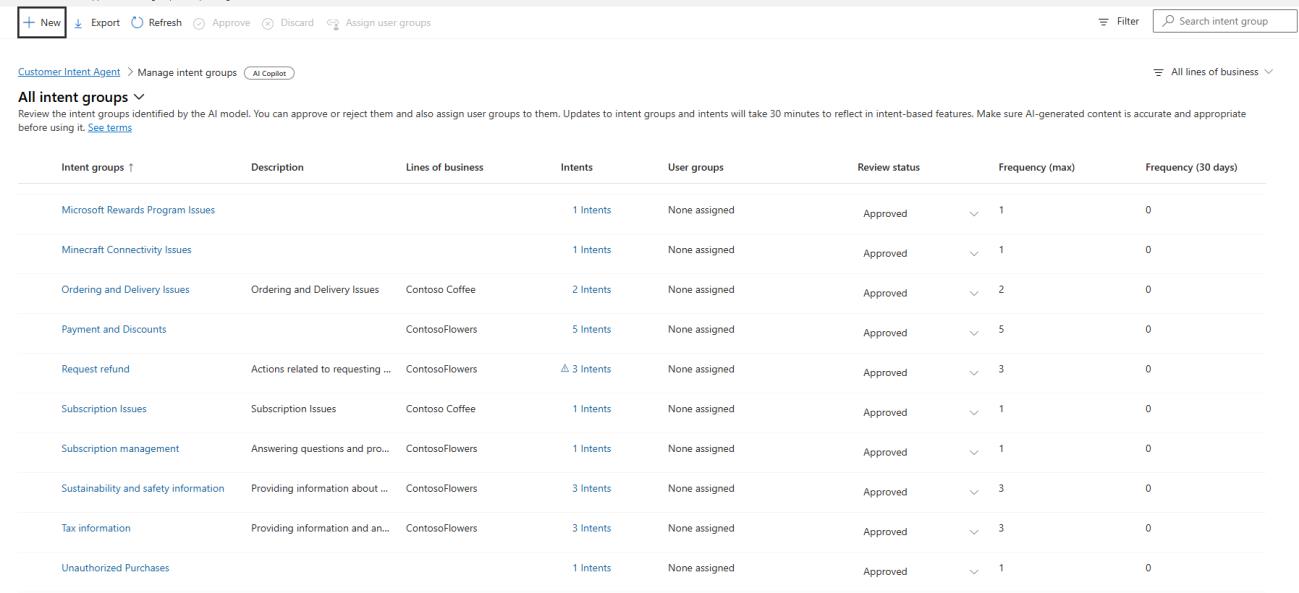
Admins should review discovered intent groups before using them in production.
Best practice:
Do not approve everything automatically.
Remove duplicate or unclear intents.
Rename only for clarity or typo correction.
Validate intent groups with business users or support leads.
Keep intent names simple and business readable.
Step 5: Manage Individual Intents
After reviewing intent groups, open the specific intents and configure their details.
For each intent, define:
Name
Intent group
Line of business
Review status
Use in AI Agent
Attributes
Knowledge articles
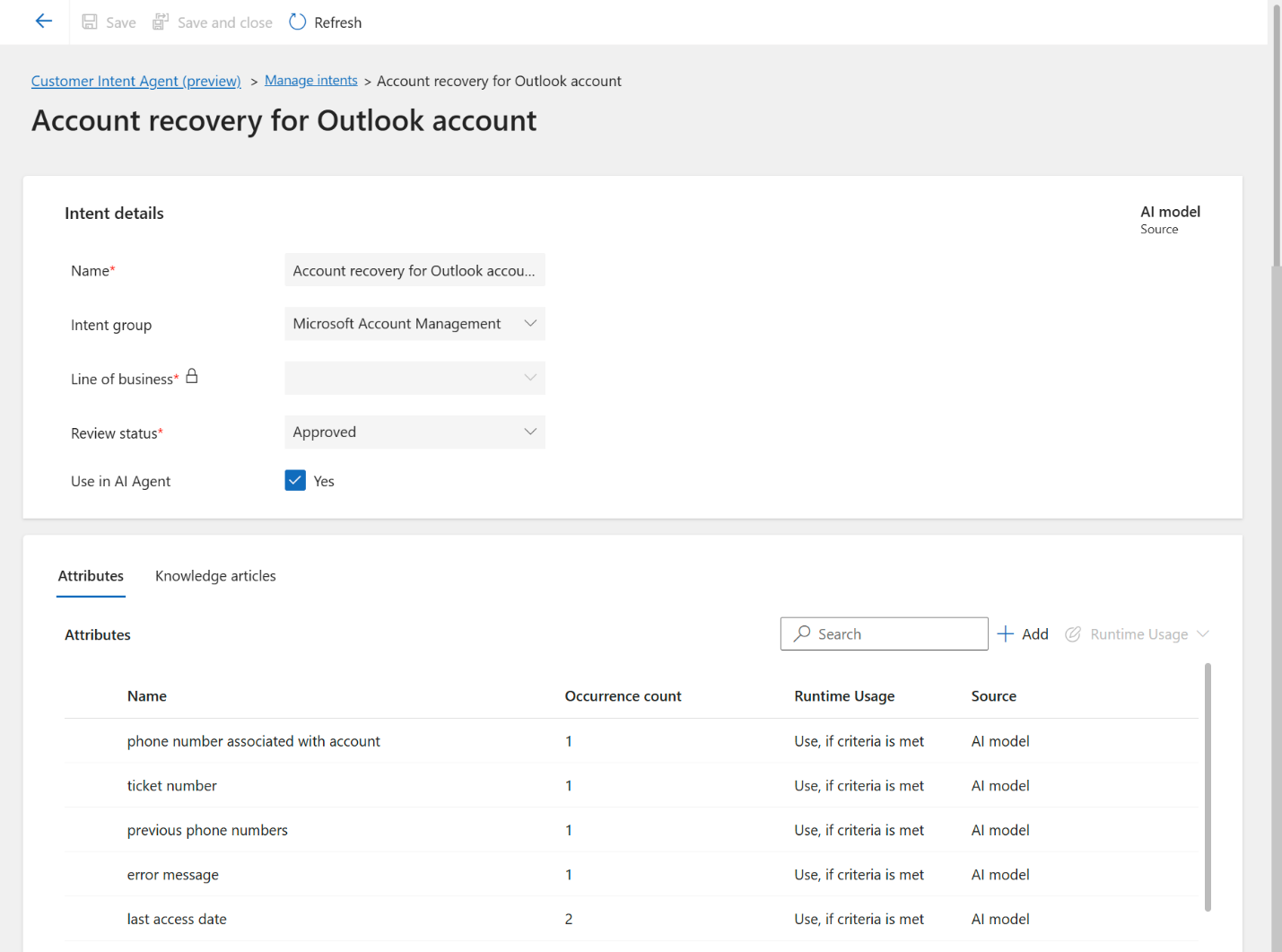
Attributes are important because they help the agent ask the right follow-up questions. For example, for a "Refund request" intent, useful attributes may include:
Order number
Purchase date
Payment method
Refund reason
Product name
Intent attributes are used to provide additional information about the intent, and knowledge articles can be associated with intents to provide additional information.
Example:
| Intent | Attributes | Knowledge Article |
|---|---|---|
| Refund request | Order number, purchase date, refund reason | Refund policy |
| Card not working | Card type, error message, transaction location | Common card decline reasons |
| Appointment reschedules | Existing appointment date, preferred date, provider | Appointment rescheduling policy |
Make sure the Use in AI Agent option is enabled for intents that should be available to Copilot agents. This is a prerequisite when using intents with Copilot agents.
Step 6: Add Instructions
Instructions help control the behavior of the Customer Intent Agent at the organizational, line of business, intent-group, or intent level.
For example, for a healthcare appointment intent, instructions may say:
'When helping with appointment rescheduling, always confirm the patient's preferred date and provider. Do not provide medical advice. If the customer asks a clinical question, escalate to a representative.'
Microsoft allows instructions to be configured for line of business, intent groups, and intents, with up to 4,000 characters per instruction entry.
Step 7: Configure Customer Intent Agent for Copilot Agents
To use Customer Intent Agent with chat or messaging Copilot agents, go to:
Customer Intent Agent > Intent-based suggestions > Enable for chatbots
Then select Manage and choose the Copilot agent connected to your contact center environment.
Microsoft explains that the Copilot agent can detect customer intent, ask follow-up questions, provide a solution from connected knowledge sources, and persist intent and interview responses if the issue is escalated to a representative.
Step 8: Enable Intent-Based Suggestions for Service Representatives
For assisted service, enable intent-based suggestions in the service representative experience profile.
Go to:
Support experience > Workspaces
or
Customer support > Intent > Customer Intent Agent > Enable for support representatives
Then open the required experience profile.
Enable:
Copilot help pane
Ask a question
Intent-based suggestions
When a representative accepts a live chat or persistent chat conversation, the Intent-based suggestions card appears in the Ask a question tab of the Copilot help pane. The intent agent maps the conversation to an intent and displays relevant intent attributes as questions.
This helps service representatives quickly understand what the customer needs and what information still needs to be collected.
Step 9: Configure Voice Scenarios
Customer Intent Agent can also be used in voice scenarios. Microsoft explains that Customer Intent Agent for voice uses generative AI to discover intents and create an intent library that enhances dynamic conversations.
For voice, the recommended pattern is:
A Copilot IVR agent answers the call.
The IVR agent captures the initial context.
The IVR agent transfers to a queue containing the Customer Intent Agent for voice.
Customer Intent Agent detects the caller's intent.
The agent asks follow-up questions and attempts to resolve them.
If unresolved, the call escalates to a service representative.
Microsoft recommends connecting the Customer Intent Agent to voice agent to a queue when granular routing control is needed, rather than connecting it directly to a workstream.
Important configuration points:
Use a voice-enabled Copilot agent.
Set the type to Uses AI-generated intents and Voice only.
Add the voice agent to a queue.
Use routing rules to send calls to the Customer Intent Agent queue.
Configure fallback routing to a human representative queue.
For line-of-business-scenarios, Microsoft documentation notes that you can set the va_LineOfBusiness context variable before the intent agent is added to the conversation. If no value is set, the voice agent falls back to the first line of business in alphabetical order.
4. Limitations & Best Practices
Limitations
Customer Intent Agent is powerful, but it should not be treated as a one-click replacement for service design.
Key limitations and considerations include:
-
Historical data quality matters
If past conversations are inconsistent, incomplete, or poorly categorized, the discovered intents may require cleanup.
-
Intent discovery still needs business review
The agent can suggest intents, but admins and business users should validate them before using them in production.
-
Voice configuration requires careful routing design
For voice, Microsoft recommends using a queue-based pattern when granular routing control is required.
-
The intent agent can read context variables but cannot set them
In voice scenarios, Microsoft states that the intent agent can only read context variables and cannot set them.
-
Connector changes may not appear immediately
Microsoft notes that after adding or removing a connector, changes can take up to 15 minutes to appear in Customer Intent Agent.
-
Intent-based routing is currently documented as a production-ready preview
Microsoft describes intent-based routing as a production-ready preview feature, so organizations should review preview terms and test carefully before using it in critical production scenarios.
Best Practices
-
Start with a focused line of business
Do not enable everything at once. Start with one support area, such as billing, appointments, returns, or product support. This makes review and testing easier.
-
Use Medium granularity first
Medium granularity usually provides a practical balance between broad and overly specific intent groups. After reviewing results, adjust if needed.
-
Keep intent names business-friendly
Avoid overly technical labels. A service manager should be able to understand the intent without needing system context.
Good examples:
Refund request
Appointment reschedules
Password reset
Delivery delay
Poor examples:
Customer issue type 14
General problem
Miscellaneous request
Failed process
-
Validate intents with real support users
Service representatives and team lead know customer language better than system admins. Include them in the review process.
-
Attach knowledge articles intentionally
Only associate articles that directly help resolve the intent. Too many loosely related articles can reduce answer quality.
-
Use clear instructions
Instructions should define tone, escalation rules, compliance boundaries, and what the agent should or should not do.
-
Test escalation paths
For both chat and voice, make sure the customer can still reach a representative when needed.
-
Monitor discovered intents over time
Customers need change. New products, policies, campaigns, or service issues may create new intent patterns. Since discovery can run daily after setup, organizations should review new intent suggestions as part of ongoing service improvement.
5. Key Takeaways & Resources
Key Takeaways
Customer Intent Agent helps Dynamics 365 Contact Center understand why customers are contacting support by analyzing historical conversations and creating an intent library.
The intent library can improve self-service, assisted service, routing, and knowledge recommendations.
Admins should review and approve discovered intents before using them in production.
Lines of business are important for larger organizations that need to separate intents by department, product, or service area.
Voice scenarios require careful queue and routing design, especially when using Customer Intent Agent alongside an existing IVR.
Intent-based suggestions can help representatives ask better questions, reduce manual typing, and resolve issues faster.
Customer Intent Agent should be treated as an ongoing improvement loop, not a one-time setup.

Syed Emad Ali |

Posted on: August 2026