
Discover how Dynamics 365 Contact Center helps healthcare organizations unify patient interactions, enable AI-powered service, and improve care access.
TLDR Summary
Healthcare contact centers often operate with fragmented telephony, routing, and EHR systems. Dynamics 365 Contact Center unifies voice and digital channels with intelligent routing and AI-powered IVR. Agents access a complete 360° patient profile within the platform, with secure real-time EHR synchronization. The result is improved patient experience, reduced handle times, stronger governance, and a scalable modern healthcare contact center architecture.
-
Product Area:
Dynamics Contact Center
-
Tags / Keywords:
Dynamics 365 Contact Center for healthcare
Microsoft Dynamics contact center healthcare
Healthcare contact center solution Dynamics 365
Omnichannel contact center for healthcare
Patient support contact center Dynamics 365
Patient access center
Patient services contact center
Patient experience improvement
Reduced call abandonment healthcare
1. Context & Problem Statement
Healthcare contact centers aren't just "customer support." They're a front door to care, handling appointment scheduling, triage escalation, referrals, billing questions, test result follow-ups, prescription coordination, and discharge outreach. The problem is that many healthcare organizations still run these interactions through disconnected tools (separate telephony, email inboxes, chat widgets, and EHR screens), which creates predictable pain:
Long handle times because agents jump between systems to validate patient identity, locate context, and document outcomes.
Inconsistent patient experiences across phone vs. digital channels (chat/SMS/email).
Limited routing intelligence (calls routed by "press 1 for…" rather than patient intent + urgency + skill).
Compliance risk when PHI is captured inconsistently, stored too long, or accessed too broadly.
-
What business/technical problem does this solve?
Dynamics 365 Contact Center is designed to manage voice and digital conversations in a single platform, apply unified routing, and provide AI-driven insights to improve service quality.
-
Why this matters for Dynamics 365 / Power Platform organizations
If you already use Dynamics 365 (Customer Service, Sales, Field Service) and Dataverse, Dynamics 365 Contact Center lets you extend those investments into the contact center with native routing, agent experiences, Teams collaboration, and reporting — rather than stitching together multiple point solutions.
Personas impacted
Contact center agents (patient services reps): need context and next-best actions during interactions.
Supervisors / QA: need visibility into queues, sentiment, outcomes, and coaching opportunities.
IT admins / solution architects: need scalable routing + integration patterns (EHR, scheduling, billing).
Compliance & security: need controls around access, recording, retention, and auditability.
Clinical staff (escalation recipients): need fast collaboration loops (often via Teams).
The "before" gap: Before moving to a unified platform, organizations often struggle with disconnected communication channels, limited routing capabilities, manual documentation, and inconsistent controls around PHI. Dynamics 365 Contact Center helps address these challenges by bringing channels, routing, insights, and collaboration together in one platform.
2. Architecture & Setup Overview
-
High-level solution flow (mental model)
A patient contacts the organization through voice (PSTN) or a digital channel (chat/SMS/social).
The interaction enters a workstream (channel configuration and behavior) and is evaluated by unified routing.
Routing assigns the work item to the best available agent using rules and/or AI classification (skills, priority, intent).
The agent handles the interaction in Dynamics, optionally collaborates in Microsoft Teams, and logs outcomes (case, task, follow-up).
Automations trigger follow-ups: appointment confirmations, lab reminders, discharge check-ins, etc.
Microsoft positions the platform as a way to manage client conversations across voice and digital channels, route interactions more effectively, collaborate through Teams, and gain better operational insights.
-
Key components you'll commonly use
Dynamics 365 Contact Center (embedded or standalone)
Dataverse (patient/contact identity mapping, cases, interaction history)
Unified routing (classification, prioritization, assignment)
Workstreams (one per channel and/or business line)
Voice channel built on Azure Communication Services (ACS) or Microsoft Teams
Teams integration for expert collaboration/escalation
Power Automate / Logic Apps (automation and integrations)
EHR integration layer (often via Azure API Management + FHIR/HL7 interfaces, depending on your EHR)
-
Prerequisites to call out up front
Region availability: your Microsoft 365 tenant must be in a supported geography for Contact Center services.
System requirements: network, hardware, and browser considerations.
Licensing for voice: specific licensing requirements apply to voice channel use.
Azure Communication Services: required for first-party voice/SMS in production and used as the foundation of the voice channel.
Security roles: for admins, agents, and supervisors (tenant + environment).
3. Step-by-Step Implementation
-
Step 1: Confirm prerequisites and region support
Validate your tenant's geographic eligibility for Dynamics 365 Contact Center services.
Review system requirements and network readiness (especially for voice).
Healthcare tip: Do this early if you have remote agents (work-from-home) and strict policies around recording, VPN usage, or device standards.
-
Step 2: Provision and enable unified routing
In your Client Service configuration, turn on/provision unified routing.
Ensure users exist and are configured in the manner required for routing enablement.
Healthcare tip: Create an initial routing taxonomy aligned to care operations: Scheduling, Billing/claims, Referral management, Nurse triage escalation, Medical records, Prior authorization support.
-
Step 3: Create workstreams aligned to healthcare service lines
Go to your admin center and navigate to Workstreams.
Select New workstream.
Create separate workstreams for channels and/or departments, for example: Patient Scheduling (Voice), Patient Scheduling (Chat), Billing Support (Voice), Clinical Escalations (Internal).
-
Step 4: Configure routing rules, queues, and skills
Define queues by function (Scheduling, Billing, Referrals, Nurse Triage).
Add skills and proficiency levels (e.g., Spanish, Pediatrics Scheduling, Medicare Billing).
Configure routing rules to classify by intent/keywords, apply priority for urgent callbacks, and route VIP/high-risk cohorts if your policies allow.
Validate unified routing behavior end-to-end.
-
Step 5: Configure recording and retention policies (where applicable)
If you enable call recordings or analyzed call data, set retention intentionally so you're not keeping sensitive content longer than necessary. Microsoft documents retention policy options for call recording data (including available retention range in applicable experiences).
4. Limitations & Best Practices
-
Known limitations / constraints to plan for
Geographic availability constraints: service availability is tied to where your Microsoft 365 tenant is located.
Voice depends on ACS: first-party voice/SMS requires Azure Communication Services in production, so network readiness and Azure governance matter.
Licensing complexity (especially voice add-ins): confirm licensing early.
-
Best practices (healthcare-focused)
Design for PHI minimization: capture only what you need in free-text fields; prefer structured fields and controlled scripts.
Least-privilege security: segment access by role (Scheduling vs. Billing vs. Clinical Escalation) and audit access patterns.
Use separate workstreams for regulated conversations: this keeps routing, security posture, and reporting cleaner.
Retention-by-policy: configure retention deliberately for call recording/analyzed call data where applicable.
Test load + peak behavior: healthcare peaks are real (Monday mornings, open enrollment, seasonal surges). Validate queue SLAs and overflow rules.
Common mistakes
One mega-queue for everything leads to long waits and constant transfers
No skill strategy makes routing into "who's free" rather than "who's qualified"
Integrations built point-to-point (hard to govern, hard to change)
Retention left at defaults without compliance review
5. Real-World Example: Building a Unified Healthcare Contact Center with Dynamics 365 and Athena Integration
Digital transformation in healthcare is no longer optional; it is essential. Patients expect seamless service, instant responses, and minimal waiting times. At the same time, healthcare providers must ensure compliance, accuracy, and operational efficiency.
In this blog, we share a real-life implementation we delivered for a healthcare client where we transformed their traditional call center into an intelligent, fully integrated digital healthcare engagement platform using Microsoft Dynamics 365 Contact Center, Microsoft Copilot Studio, and Athenahealth. This was not just an IVR implementation. It was a complete voice-to-clinical data transformation.
-
The Business Challenge
The healthcare provider was facing several operational challenges:
High call volumes for appointment scheduling and changes
Manual data entry into Athena by agents
Long wait times during peak hours
Agents switching between multiple systems
Risk of data inconsistency between contact center and EHR
Limited visibility of patient history during live calls
They needed AI-driven self-service, real-time appointment management, complete patient visibility for agents, bi-directional integration with Athena, reduced average handling time, and improved patient experience.
-
The Solution Architecture Overview
We designed a solution where the voice channel became the primary intelligent entry point.
Patient calls hospital number
Call routed via Dynamics 365 Contact Center Voice Workstream
AI IVR built in Copilot Studio handles conversation
Secure API layer connects to Athena
Real-time data synchronization between systems
Unified agent workspace with full patient visibility
-
Step 1: The Calling Experience
When a patient dials the hospital number, the number is configured in Dynamics 365 Contact Center. The call routes to a configured Voice Workstream, which triggers the Copilot Studio IVR. This is not a traditional "Press 1" IVR — it is a conversational AI.
The IVR greets: "Thank you for calling. How can I assist you today?"
Patients can naturally say: "I want to book an appointment," "I need to reschedule," "Cancel my appointment," or "I want to talk to someone." Intent detection is handled dynamically.
-
Step 2: Identity Verification
Before accessing patient records, the system verifies identity using a registered phone number, date of birth, and MRN or appointment ID (if required). Once verified, the system securely retrieves patient data from Athena in real time.
-
Step 3: Self-Service Appointment Automation
Patients can complete the following directly within the call:
-
Scheduling an Appointment
Select hospital location, choose department, select doctor, choose date and time. Available slots are fetched live from Athena. Once confirmed, the appointment is created in Athena instantly, a confirmation number is generated, and the IVR reads confirmation to the patient. Total time: under 3 minutes. No CSR is involved.
-
Modifying an Appointment
Existing appointment is retrieved, alternative slots are offered, selection is confirmed, and the appointment is updated in Athena immediately.
-
Canceling an Appointment
Identity is verified, cancellation is confirmed, the record is updated in Athena, and confirmation is provided.
-
-
Step 4: Intelligent Agent Routing
If self-service cannot resolve the issue, or the patient requests an agent, the call is routed using skills-based routing, department queues, overflow conditions, business hours logic, fallback queues, and voicemail configuration — all managed inside Dynamics 365 Contact Center.
-
Step 5: Unified Agent Experience (Patient 360° View)
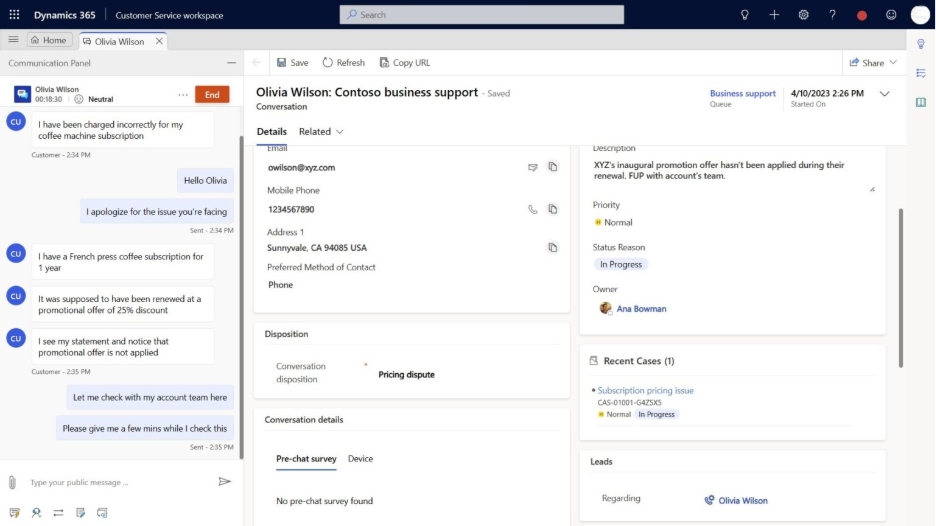
When the call reaches an agent, the agent workspace automatically displays complete patient information retrieved from Athena, including medical history, insurance carriers, emergency contacts, patient estimate history, appointments, allergies, encounters, immunizations, orders, and clinical notes. The agent does NOT log into Athena. Everything is visible within Dynamics 365.
-
Bi-Directional Data Synchronization
This was one of the most critical components of the implementation. If an agent updates insurance information, emergency contact details, clinical notes, appointment data, orders, or allergy information, the updates are immediately pushed back to Athena via secure APIs. There is:
No manual reconciliation
No batch job delay
No duplicate data
No inconsistency
Both systems remain synchronized in real time
-
Technical Integration Design
The architecture included:
Secure REST API integration with Athena
Token-based authentication
Real-time request-response model
Field-level data mapping between systems
Error handling and retry mechanisms
Audit logging for all transactions
Data visibility was role-based, ensuring: only authorized agents can view sensitive data, department-based access control and compliance with healthcare security standards.
-
Security & Compliance
Given the healthcare nature of the system, we ensured:
Encrypted API communication
Secure identity verification before data access
Role-based access within Dynamics 365
Full audit tracking
Controlled data exposure per user role
Patient data integrity and confidentiality were non-negotiable
-
Real-Life Patient Journey Example
Let's walk through a real scenario:
The patient calls the hospital.
IVR greets and asks how it can help.
Patient says: "I want to schedule a cardiology appointment."
IVR verifies identity.
Available cardiology doctors are fetched from Athena.
Patient selects the next available slot.
Appointments were created instantly.
Confirmation is shared.
Later, the patient calls again to reschedule.
Appointments were retrieved.
New slots were selected.
Update reflected in Athena in real time.
No agent is required in both cases.
Now imagine another scenario:
Patient calls regarding insurance clarification.
Call routes to the agent.
Agent views full insurance history and medical profile.
Updates insurance details.
Change is instantly reflected in Athena.
One unified experience.
-
Business Impact Achieved
Reduced Average Handling Time: Agents stopped switching systems.
Increased First Call Resolution: Full patient visibility during calls.
Lower Operational Costs: Self-service handled high-volume requests.
Improved Patient Satisfaction: Faster scheduling and instant confirmation.
Improved Data Accuracy: Single synchronized source of truth.
Conclusion
This implementation demonstrates how healthcare organizations can transform their contact centers into intelligent, fully integrated clinical engagement platforms. By combining conversational AI, intelligent voice routing, real-time appointment automation, complete patient 360° visibility, and bi-directional EHR synchronization, we helped the client move from a traditional call center to a connected digital healthcare ecosystem. This was not just automation — it was a strategic healthcare digital transformation.
Known Limitations of Dynamics 365 Contact Center
While Dynamics 365 Contact Center is a powerful and rapidly evolving platform, there are certain limitations and considerations organizations should be aware of during implementation.
-
1. Licensing & Cost Complexity
Licensing structure can be complex (base license + add-ons + telephony).
Voice, digital channels, and Copilot capabilities may require separate SKUs.
Cost increases significantly for large-scale voice deployments.
Proper licensing assessment is critical before architecture design.
-
2. Telephony Dependency & Regional Availability
Voice capabilities often rely on Azure Communication Services (ACS), Direct Routing, or Operator Connect.
Telephony number availability may vary by region.
Call quality can depend on network conditions and carrier setup.
Careful telephony planning and network assessment is required.
-
3. Reporting & Analytics Limitations
Out-of-the-box reporting may not cover advanced operational KPIs.
Historical reporting flexibility can be limited.
Client dashboards often require Power BI integration.
Real-time analytics depth is not at the level of some legacy contact center platforms.
Advanced reporting typically requires custom Power BI models.
-
4. Scalability Considerations
For very high-volume enterprises:
IVR latency may increase with complex flows.
API-heavy designs can introduce performance bottlenecks.
Concurrent call limits must be reviewed during capacity planning.
Load testing is essential before go-live.
-
5. UI & Agent Workspace Customization Limits
While the agent workspace is flexible:
Advanced UI customization may require development.
Embedded third-party apps can impact performance.
Complex forms may reduce usability if not designed carefully.
UX design plays a major role in adoption.
-
6. Change Management & Learning Curve
Agents need training for unified workspaces.
Admin configuration requires technical understanding.
Voice, bot, and routing setup can be complex initially.
Proper enablement and documentation are critical.
Important Perspective
Despite these limitations, Dynamics 365 Contact Center offers strong advantages: native CRM integration, AI-driven conversational capabilities, seamless Microsoft ecosystem compatibility, flexible API architecture, and a rapid innovation roadmap. For organizations already within the Microsoft ecosystem, it can be extremely powerful — provided implementation is architected correctly.
Key Takeaways & Resources
Key takeaways
Dynamics 365 Contact Center unifies voice + digital conversations, unified routing, Teams collaboration, and embedded insights in one platform.
Unified routing enables more intelligent assignment using rules and AI-driven classification for omnichannel work items.
Voice capabilities rely on Azure Communication Services and require proper readiness (region, network, licensing).
For healthcare, governance matters as much as features: plan security, retention, and workflow separation early.
Resources (Microsoft)

Syed Emad Ali |


Syed Huzefah |
Posted on: 28 July 2026