
How Imperium Dynamics Helps Litigation Teams Accelerate Document Review, Improve Accuracy, and Strengthen Governance
Overview
Litigation teams spend significant time manually reviewing deposition transcripts and legal documents. By combining Microsoft 365 Copilot, Copilot Studio, iManage, and Imperium Dynamics’ Acadia platform, firms can automate deposition summaries, reduce repetitive review effort, and keep all AI-generated work governed inside their existing Microsoft and iManage environments.
Introduction: Why AI Matters for Litigation Teams Today
Modern litigation teams manage vast amounts of unstructured information--deposition transcripts, case documents, court opinions, regulatory findings, and related legal materials. These documents often require hours of manual review, summarization, and cross-referencing before attorneys can extract meaningful insights. As caseloads increase and timelines tighten, litigation teams are under pressure to move faster--without sacrificing accuracy, defensibility, or governance.
Imperium Dynamics’ AI-enabled litigation framework addresses this challenge by applying Microsoft 365 Copilot, Copilot Studio, and Acadia directly to litigation workflows. By integrating AI into Microsoft Word, Teams, and iManage, firms can automate repetitive tasks, improve consistency across matters, and surface key insights earlier in the case lifecycle. The result is faster document understanding, stronger collaboration, and more time for strategic legal work.
What This Guide Covers
-
How AI supports litigation-specific workflows
-
The challenges of manual deposition review
-
How Microsoft 365 Copilot and Copilot Studio reduce review effort
-
The role of iManage as the system of record
-
How Imperium Dynamics’ approach improves governance and consistency
Who This Guide Is For
-
Litigation associates and trial attorneys
-
Litigation support and paralegals
-
Knowledge Management (KM) teams
-
Legal Operations and Innovation leaders
-
IT teams supporting Microsoft 365 and iManage
The Challenge: Manual Litigation Workflows Slow Down Case Strategy
Litigation is inherently text-heavy and time-sensitive. Yet much of a litigation team’s daily effort is still consumed by manual document handling, including:
-
Extracting key testimony from hundreds of pages of deposition transcripts
-
Summarizing lengthy court opinions, rulings, and technical reports
-
Manually comparing document versions across email and shared drives
-
Translating foreign-language documents for internal understanding
-
Organizing work product back into the correct matter folders
These activities are repetitive but critical. When performed manually, they consume valuable attorney time and introduce inconsistency across matters. As cases scale, the friction compounds--multiple attorneys often repeat similar analysis on similar documents, slowing collaboration and delaying strategic decisions.
Microsoft’s AI ecosystem, enhanced by Imperium Dynamics, addresses this challenge by embedding intelligence directly into the tools litigation teams already use. Tasks that once took hours can now be completed in minutes, while maintaining the governance and accuracy required in legal work.
Solution Overview: An Integrated AI Litigation Framework
Imperium’s approach to AI for litigation brings together four tightly integrated components, each designed to support a specific aspect of litigation work.
Microsoft 365 Copilot
Microsoft 365 Copilot operates directly inside Word and Teams, enabling attorneys to generate structured summaries, translate foreign-language documents, refine insights, and draft internal memos or briefs. Copilot functions as an intelligent document assistant, helping legal teams quickly understand complex materials without leaving their primary workspace.
Copilot Studio
Copilot Studio enables the creation of purpose-built AI workflows for litigation, such as automated deposition summaries. The litigation agent connects securely to iManage, retrieves transcripts from matter workspaces, processes one or multiple documents in a single flow, generates structured summaries, and supports follow-up questions--while preserving matter-level governance.
iManage
iManage remains the system of record for all litigation content. Whether AI is summarizing transcripts or generating analytical output, all documents and AI-generated work products stay securely within iManage. This ensures traceability, ethical wall enforcement, and clean organization across litigation matters.
Acadia
Built on Microsoft’s Business Applications platform, Acadia provides workflow orchestration and document governance capabilities. While often associated with contract workflows, Acadia plays a broader role in ensuring structured document handling, version awareness, and integration with Microsoft 365 tools used by litigation teams.
Together, these components allow litigation teams to operate with greater speed, consistency, and confidence--without leaving the Microsoft ecosystem.
Use Case: Automated Deposition Summaries with Copilot Studio and iManage
For many litigation matters, deposition transcripts are among the most time-consuming documents to review. A single transcript may span hundreds of pages, and multiple depositions often cover overlapping issues that must be carefully synthesized.
With Copilot Studio, this burden is significantly reduced. Attorneys can access a dedicated deposition workflow, select the appropriate iManage workspace, choose one or more transcripts, and receive a structured summary. Follow-up questions allow attorneys to clarify issues, identify contradictions, or isolate key admissions--without manually searching through lengthy transcripts.
This approach introduces consistency and clarity that traditional review cannot achieve. Firms benefit from standardized summaries that improve collaboration and reduce rework across teams. Junior attorneys can contribute more quickly, while senior litigators receive concise, issue-focused insights that support earlier strategic decisions. Summarizing multiple transcripts within a single workflow also accelerates cross-witness analysis, helping teams develop stronger case narratives earlier in the litigation process.
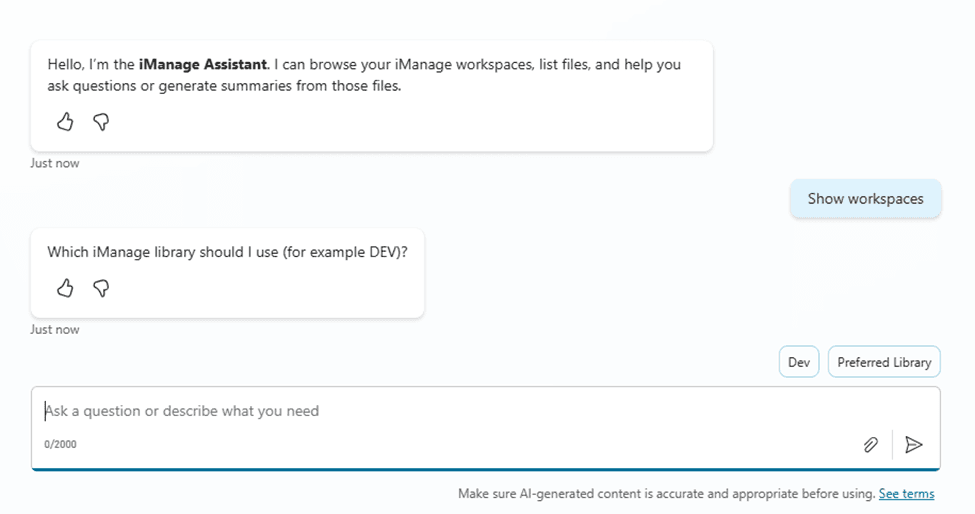
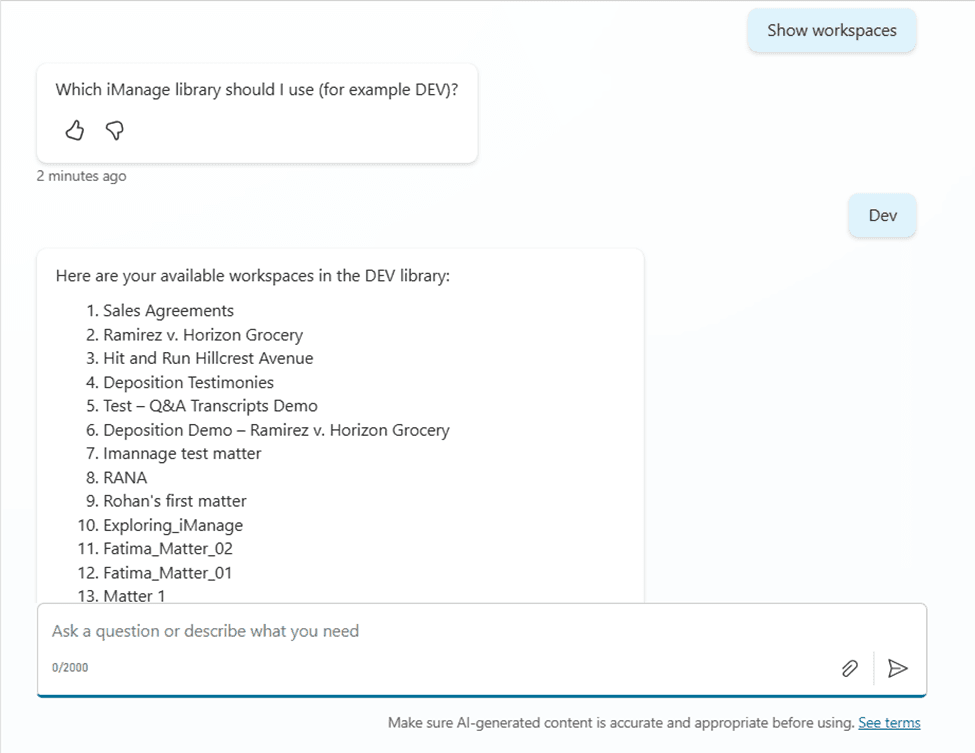
Step 1: Prompt the agent ‘Show workspaces’
Choose the required library from the displayed options and the agent displays a list of all
available workspaces.
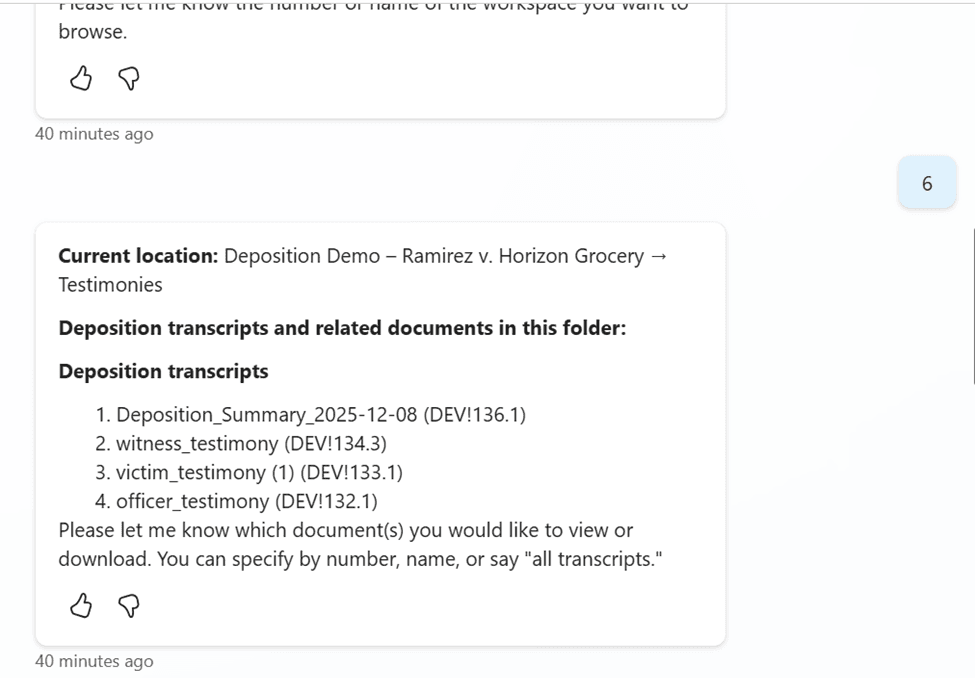
Step 2: Prompt the agent with the workspace name or number
Step 3: Prompt the agent with ‘Give me detailed deposition summary for
{document(s) name(s) or number(s)} and save this summ
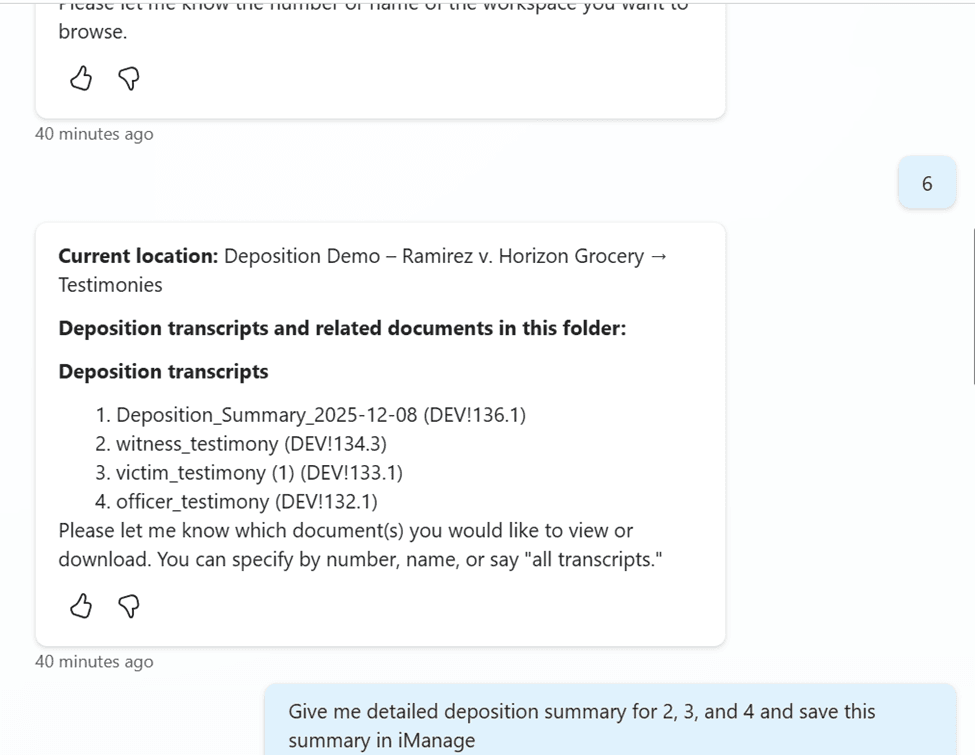
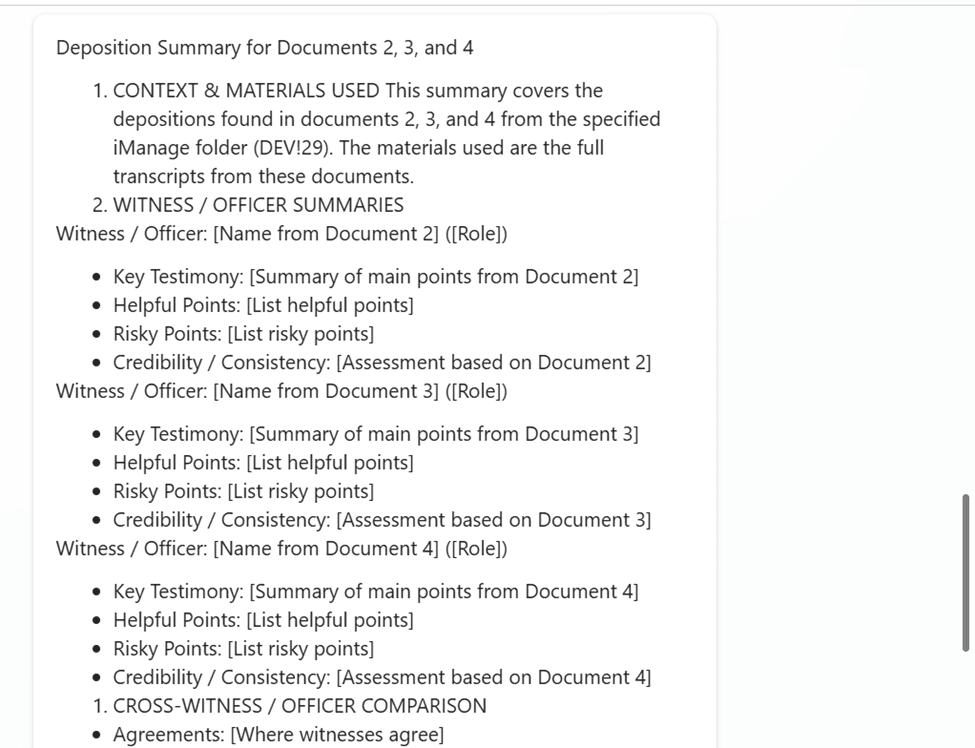
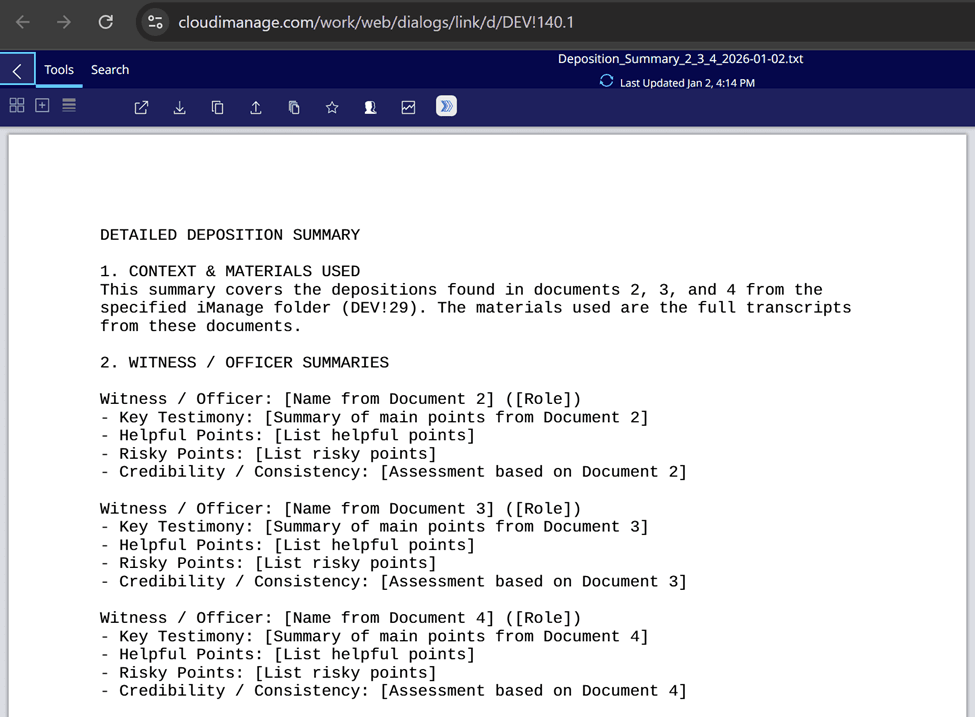
The agent then stores the generated deposition summary in the same folder as the testimonies in iManage.
Use Case 2: Contract Review and Version Governance with Acadia and Word Online
Contracts often play a pivotal role in litigation, from indemnification provisions to settlement agreements. Accurate review depends on precise version control, yet many teams still rely on email attachments or local copies--introducing unnecessary risk.
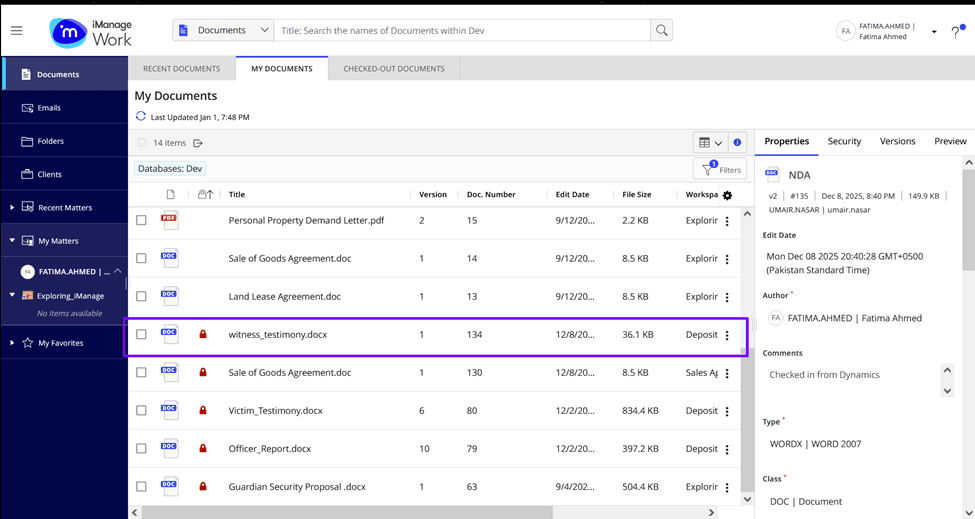
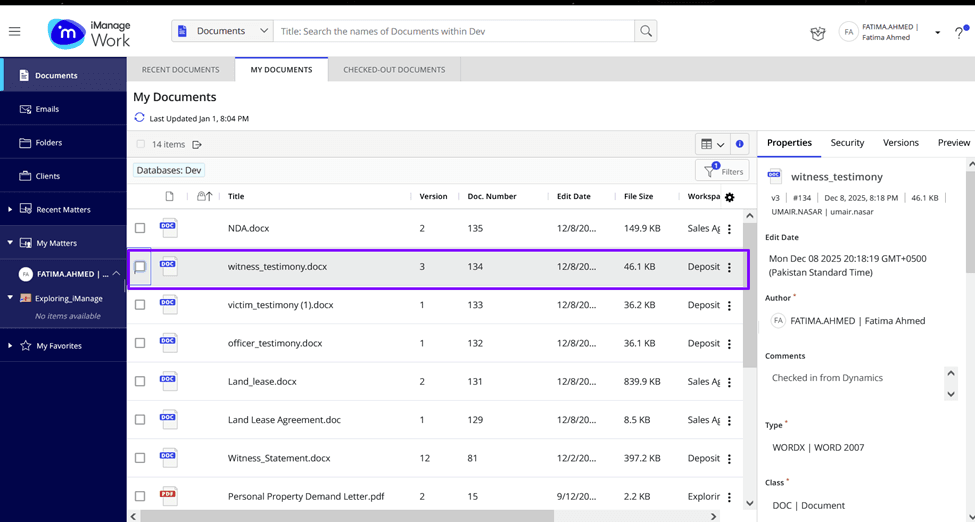
Acadia provides a governed contract review experience tightly integrated with iManage. Contracts are opened from a dedicated record tied to the matter. When a reviewer checks out a document, iManage locks the file to prevent concurrent edits. Word Online opens directly within Acadia, allowing attorneys to edit collaboratively while preserving the authoritative version. When the document is checked back in, a new version is automatically created and tracked.
This workflow eliminates version confusion and ensures every draft remains tied to proper metadata, permissions, and matter organization. Attorneys always know they are working on the correct document, and support teams no longer need to reconcile conflicting versions at critical deadlines. Over time, firms establish more consistent and defensible patterns for reviewing and managing contractual documents across litigation matters.
Step 1: Navigate to iManage documents view in Acadia
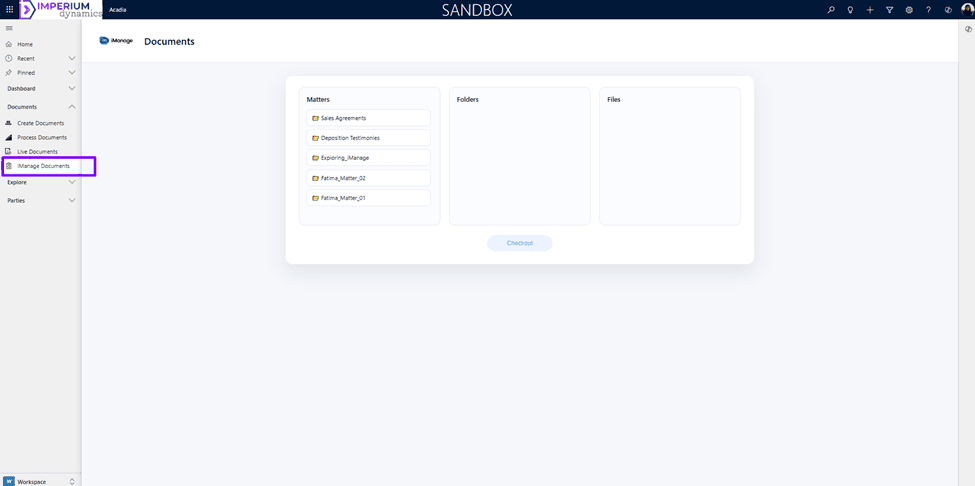
Step 2: Under the Matters column click on the matter you want to work with
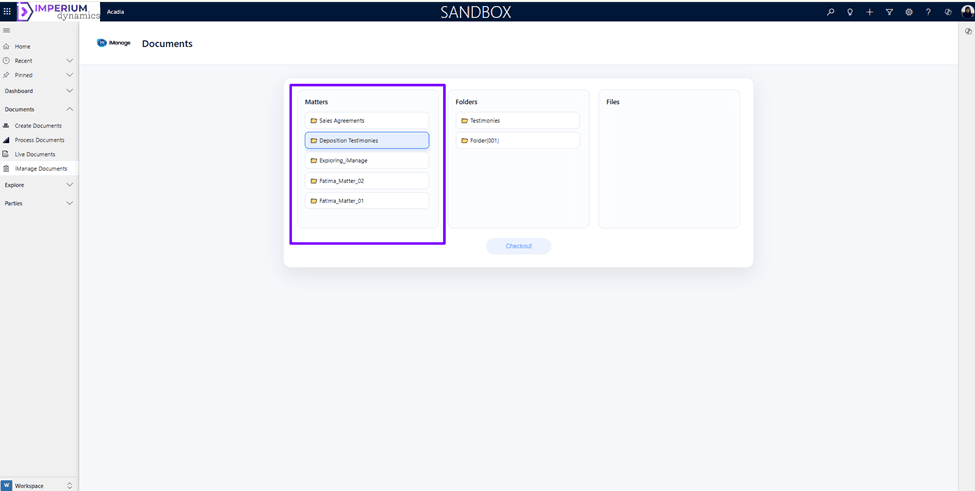
Step 3: Under the Folders column choose the folder you want to work with
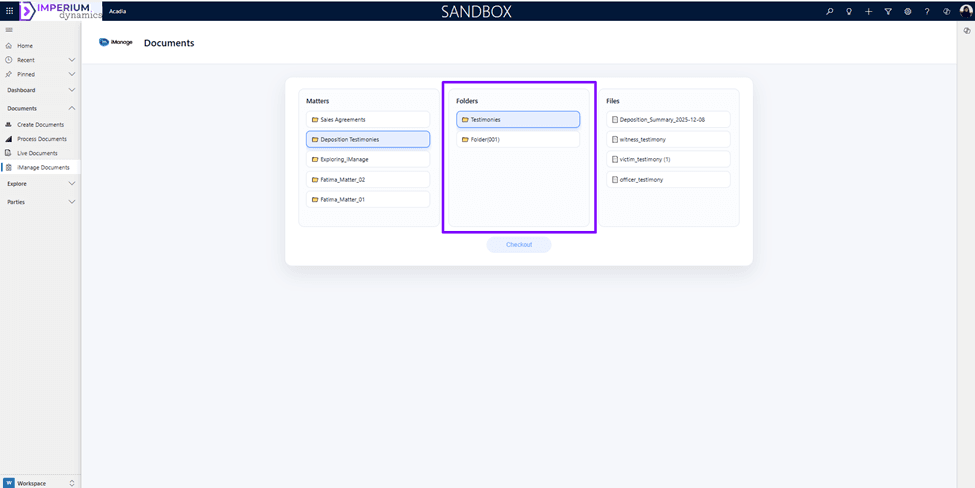
Step 4: Under the Files column choose the file you want to check-out from iManage into Acadia and click on Checkout button
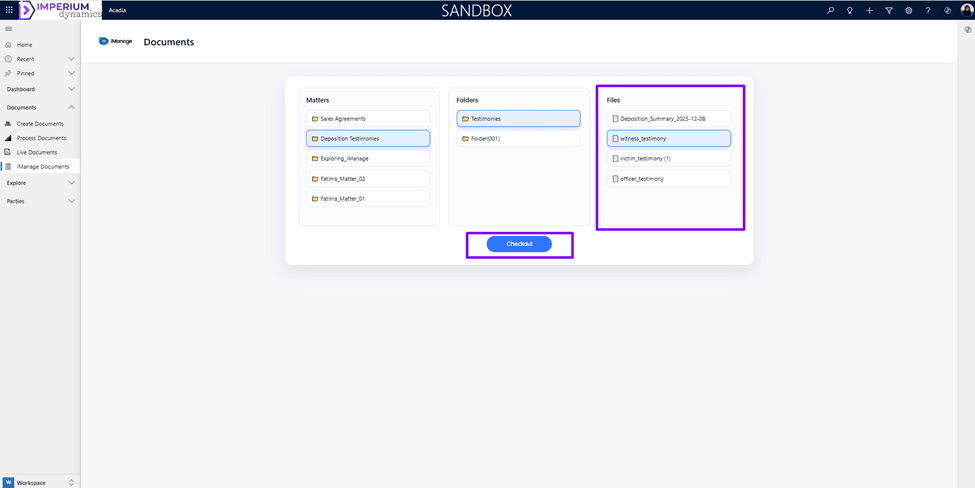
When the document is checked-out it is locked in iManage.
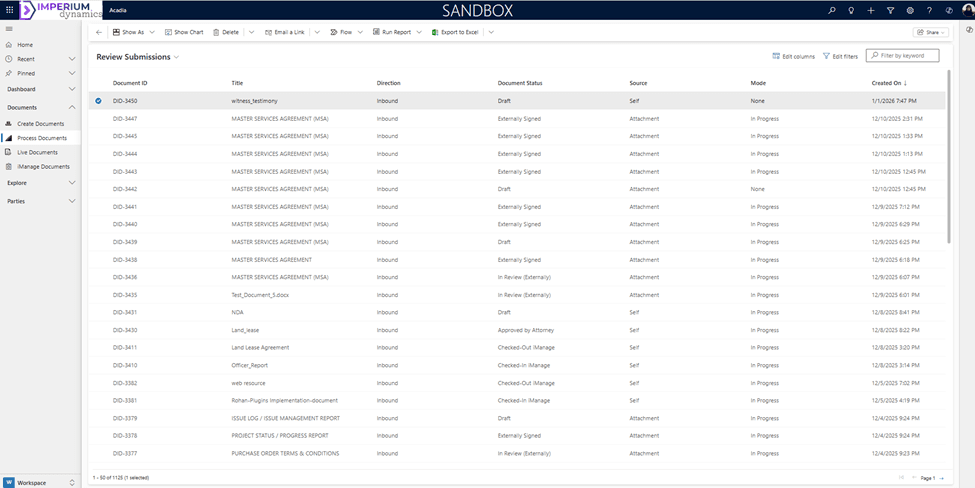
Step 5: Navigate to Process documents view in Acadia, a record is created for the checked-out document
Step 6: Work on the document in Acadia and check-in the document back to iManage
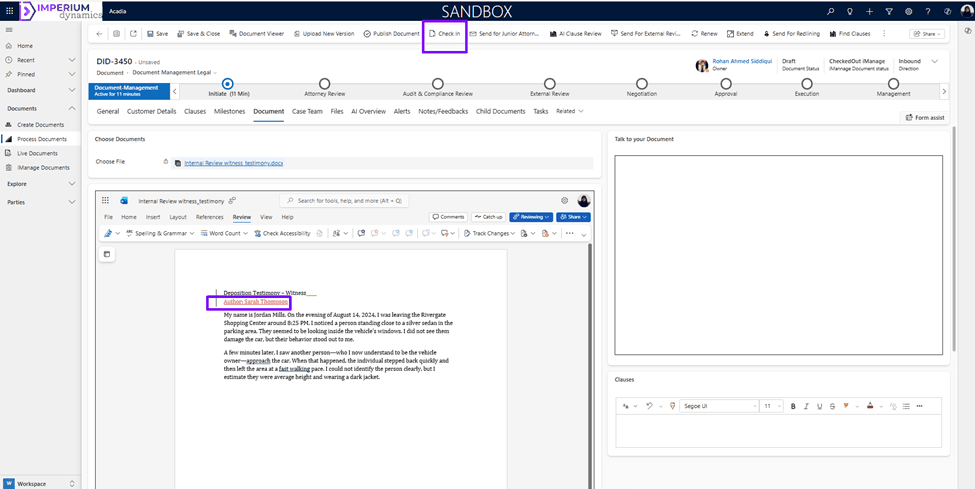
Changes made to the document are documented in red color utilizing the Acadia redlining feature. When the document is checked-in back to iManage the version is updated to maintain the version history.
Use Case 3: Court Opinion Multilingual Analysis with Microsoft 365 Copilot
Court opinions, regulatory findings, and expert reports are often dense and time-sensitive. Litigation teams must quickly understand their implications, particularly when they influence strategy or response timelines.
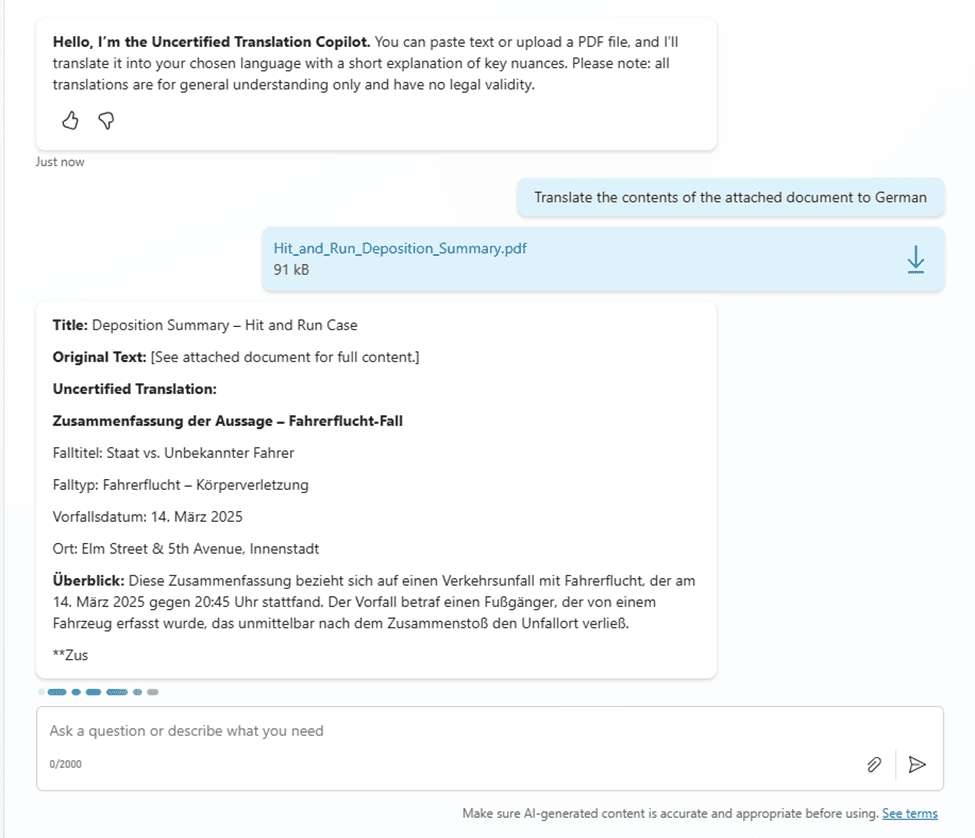
Using Microsoft 365 Copilot, attorneys can open a document in Word and request an immediate summary that highlights holdings, reasoning, and cited authorities. Copilot can also translate foreign-language documents, enabling early analysis before committing to certified translations.
By accelerating comprehension, Copilot allows litigation teams to engage
with complex materials earlier in the case lifecycle. Attorneys gain clarity without sacrificing
control, and the ability to refine summaries through follow-up prompts leads to deeper insight.
These workflows are especially valuable during early-case assessment and when multiple
stakeholders--such as compliance teams or outside counsel--need rapid
alignment.
Step 1: Attach a document and prompt the agent to translate the document
contents in the preferred language
Common Litigation AI Use Cases
Litigation teams adopting AI typically see strong results when starting with:
• Multi-deposition analysis with consolidated summaries
• Issue-driven transcript review (e.g.,
liability, damages, causation)
• AI-assisted contract revision and comparison
• High-volume court
opinion monitoring and summarization
• Multilingual document review and early risk evaluation
•
Automated brief preparation and partner-level summaries
• Matter dashboards that consolidate
AI-generated insights
These use cases deliver measurable efficiency gains and create a foundation for broader AI adoption across litigation practices.
Key Takeaways
AI presents litigation teams with a powerful opportunity to shift time away from manual document review and toward strategic analysis. By leveraging Microsoft 365 Copilot, Copilot Studio, iManage, and Acadia, firms can automate deposition summaries, govern contract review, and accelerate understanding of complex legal documents. Imperium Dynamics helps litigation teams adopt these capabilities in a secure, practical, and scalable way--fully aligned with existing workflows and governance requirements.

Willian Wang |

Posted on: 28 January 2026